SKILL 營運解題 · MK-037
Before You Spend NT$6,000 on a New Moving Assessment Page: What to Check First
Before approving budget for a website or workflow redesign, first identify the key unknown that would change your decision. Check three types of evidence—customer questions, actual tool usage, and immediate readiness and willingness to act—and stop once you can choose an option. Separate verbal willingness from actual submissions, then let the verified bottleneck determine whether to keep the page as is, add instructions, fix features, or compare viable new-build options. Before comparing costs, ensure all options solve that same need, treat past spending as a shared baseline, and count only new verification and add-on costs. Compare this new outlay against the net contribution per additional completed order—after cancellations, refunds, and variable costs—to find the profit-increasing threshold: between two viable options, the pricier one must generate enough extra orders to cover the cost difference; if only one works, weigh its threshold against your affordable budget, then verify actual order gains through post-launch order records.

On Monday morning, Chia-ying, the marketer at a furniture store, slipped an add-on quote from their outside vendor into the folder on her desk. It had been just a week since the updated delivery page from the previous article went live. The stairwell measurement guide was now in place, the existing form had passed internal testing, and the delivery team had confirmed they could receive test submissions.[1] This time, the vendor was pitching a follow-up update to build a separate moving-access assessment page and submission flow for NT$6,000.
Chia-ying’s first instinct was straightforward. Since customers were still coming back to customer service asking how to get a sofa upstairs, why not build out a fuller process so they could complete it on their own? She had already mapped out the page structure in her head. It would ask for the staircase type first, then the corner dimensions, and finally contact details, so the delivery team could review the submission and reply on whether the sofa would fit.
A-Zhe from customer service handed over a memo on a recent moving inquiry. The note recorded that a customer had asked how to measure their stairs, while the rest of the conversation log was blank. They still needed to verify whether the customer already had the measurements in hand and whether they were looking at the newly updated live page when they asked. A-Zhe said he knew the customer had asked about how to measure, but they still needed to verify where the person had stopped. If the customer just wanted a clearer look at how to take the measurements, adding a diagram to the existing page would do. If the customer couldn’t get the measurements right then, building a separate submission flow wouldn’t help yet either.
That gave Chia-ying pause. She opened the live delivery page herself and walked through the existing form the same way she had the week before. She clicked from the product listing into the delivery details, found the measurement section, filled in a sofa model and dimensions, and submitted the form. The delivery team reported back that the test submission had come through. That confirmed the measurement guide, form, and receiving flow updated the previous week were still working, and that the live page and completed work could be kept as they were.[1]
So what else actually needed to be added on top of that foundation?
Before deciding whether to spend budget on a website update, match three things along the same customer path to actual evidence: the customer’s problem, how usable the existing page is in practice, and what action the customer is both able and willing to take at that moment. Then pick the unknown that would change your approval decision today, check that item first, and stop as soon as you have enough evidence to decide whether to switch options.[2][3] When an existing page already works, keep it in place first. For this round, the team commits NT$600 in verification costs to organize the inquiry evidence in hand and run a neutral user task observation.[4]
What that check turns up directly determines how to handle the two add-on quotes. If the observation confirms the current page needs a clearer measurement diagram or field instructions, approve the NT$1,000 update to the existing page (NT$1,600 total including this round’s verification cost). If supplementing the existing page and building a separate page can both solve the same confirmed need, evaluate the NT$6,000 new-build option (NT$6,600 total including verification) on the same baseline. If the observation confirms the current page and flow genuinely cannot support the need and building a separate flow is the only way to get the job done, evaluate the new-build option on its own break-even threshold and what the store can afford to invest. And if the current page already lets customers complete their immediate task, hold back both add-on budgets.
Running the numbers makes the choice clearer. With each additional completed order contributing NT$1,200, updating the existing page takes 2 additional completed orders to start coming out ahead in the current period, while building a separate page takes 6. When both options can solve the same confirmed need, the new-build option has to bring in at least 5 more completed orders than the existing-page update to earn more overall. If only the new-build option can solve the problem, the decision comes down to whether a threshold of 6 additional completed orders and a total outlay of NT$6,600 make sense for the store. Actual order gains remain to be verified until after launch, and the team uses the evidence they uncover to decide which piece of work to approve today.
The Existing Page Passed Internal Testing—Why Check the Parts Separately Before Approving More Work?
After walking through the delivery page herself, Chia-ying reviewed the customer service memo with A-Zhe. The memo had the customer’s exact words, the sofa model they asked about, and the measurement instructions A-Zhe had sent back. What still needed to be recorded was which page the customer had open at the time, which section they stopped at, and whether they had a tape measure or dimensions on hand. The fact the team currently held was that someone had asked how to measure, while whether that person could use the existing page to finish measuring and submit an assessment on the spot remained to be verified.[2][3]
When reviewing a quote for a site update, it is easy to treat a live feature and a customer’s actual behavior as the same thing. To see clearly which part of the path the NT$6,000 proposal was meant to fix, Chia-ying traced that single moving inquiry and broke the path down into three premises to verify.[2][3]
The first premise is that the customer’s problem actually lies where we think it does. The inquiry on A-Zhe’s desk specifically asked about measuring stairs, so that clue holds up, and its scope is initially limited to this single inquiry. Whether other people arriving from search are getting stuck on measurement instructions—or are actually asking about something else—still has to be checked against subsequent search queries and customer service logs.[3]
The second premise is that the existing page lets customers understand the instructions and finish the steps on their own. When Chia-ying submitted her test form, she verified that the flow worked internally: the form functioned properly and the receiving end got the data. How a customer reads that measurement diagram upon opening the page, whether they can find the input fields, and how smoothly the form submits across different phones all require evidence from actual customer interaction.[3][4]
The third premise is that, in that moment, the customer has both what they need and the willingness to take the next step. The memo shows the customer wanted to check how to measure, which supports the point that they needed information. Whether the customer was actually on site at the time, had the dimensions in hand, and was ready to fill out and submit a form right away is a separate question. Saying they are willing to submit and actually sending the data also need to be recorded separately.[2][3]
An existing button on a page and a customer willing to press that button to send data represent two different pieces of evidence.[3] Looking at the quote on her desk, Chia-ying realized that before deciding whether to spend the NT$6,000, she needed to check how far each of the three types of evidence actually went. Seeing the real gap would tell her whether to keep the existing page, add clearer instructions, fix a feature, or evaluate building a new page.
Mapping That Single Moving Inquiry into an Information Gap Table
So the team could see what they already knew and what was still missing, Chia-ying opened the seven-column table from the MK-037 Information Gap Interpretation framework and mapped the moving inquiry across three rows.[2] She set a single unit of analysis for all three: “a person asking about stair measurements, moving from the live delivery page to submitting a moving assessment.” Each row checks one specific type of gap, and the downstream use column names the person responsible, the minimum next piece of evidence required, and the condition for switching options.[2]
| Unit of Analysis | Raw Clue | Classification Definition | Classification Result | Support / Counterexample | Unknowns | Downstream Use |
|---|---|---|---|---|---|---|
| Customer problem in the moving inquiry | One stair-measurement inquiry saved by A-Zhe; we know the customer wanted to know how to measure before ordering | Customer problem gap: verify where this person is actually stuck | Clue exists for this need; scope initially limited to this single inquiry | Exact wording points to measurement instructions. If checking the original message shows they actually asked about moving fees, reclassify the measurement judgment as pending determination | What other searchers are asking, and whether the question came up before or after reading the updated page | A-Zhe checks the original message and which page version was open at the time. If they asked about measuring, schedule a task observation. If they asked about fees, inspect the delivery fee explanation instead and hold back the measurement update budget |
| Live page and form | Chia-ying opened the current delivery page, submitted data through the existing form, and the delivery team confirmed receiving the test order | Page usability gap: verify what the current page actually lets users do | Passed internal testing; customer reading and interaction remain to be verified | Evidence exists for the live page, existing form, and receipt. If certain phones fail to submit, trace the failed step | Whether customers get stuck on the measurement diagram, the input fields, or submission, and whether real submitted data is sufficient for evaluation | Chia-ying logs the device, page version, and submission record, and has participants look for the measurement instructions on their own. If only the diagram caption is unclear, add captions to the existing page. If a function fails, fix that function first. Evaluate a new build only if the current page genuinely cannot support the required assessment |
| Immediate action taken | A-Zhe knows the customer wanted measurement instructions, while the memo does not record whether they had dimensions on hand or were willing to submit | Action willingness gap: verify what step the customer is both willing and able to take right then | Insufficient evidence | Wanting to learn how to measure supports a need for information; whether they submit is read back from their actual behavior and reasons at the time. Verbal willingness and actual submission are recorded separately | Where the customer was at the time, whether they had dimensions on hand, and any concerns or conditions regarding the next step | A-Zhe first asks what information they had already prepared at the time, then asks them to complete whichever part of the task they can currently do on their own. If they lack dimensions, provide a takeaway measurement guide first. If they have dimensions but get stuck on a field, clarify the field. If they still only want to check shipping costs, switch to fee information and hold back the measurement update budget |
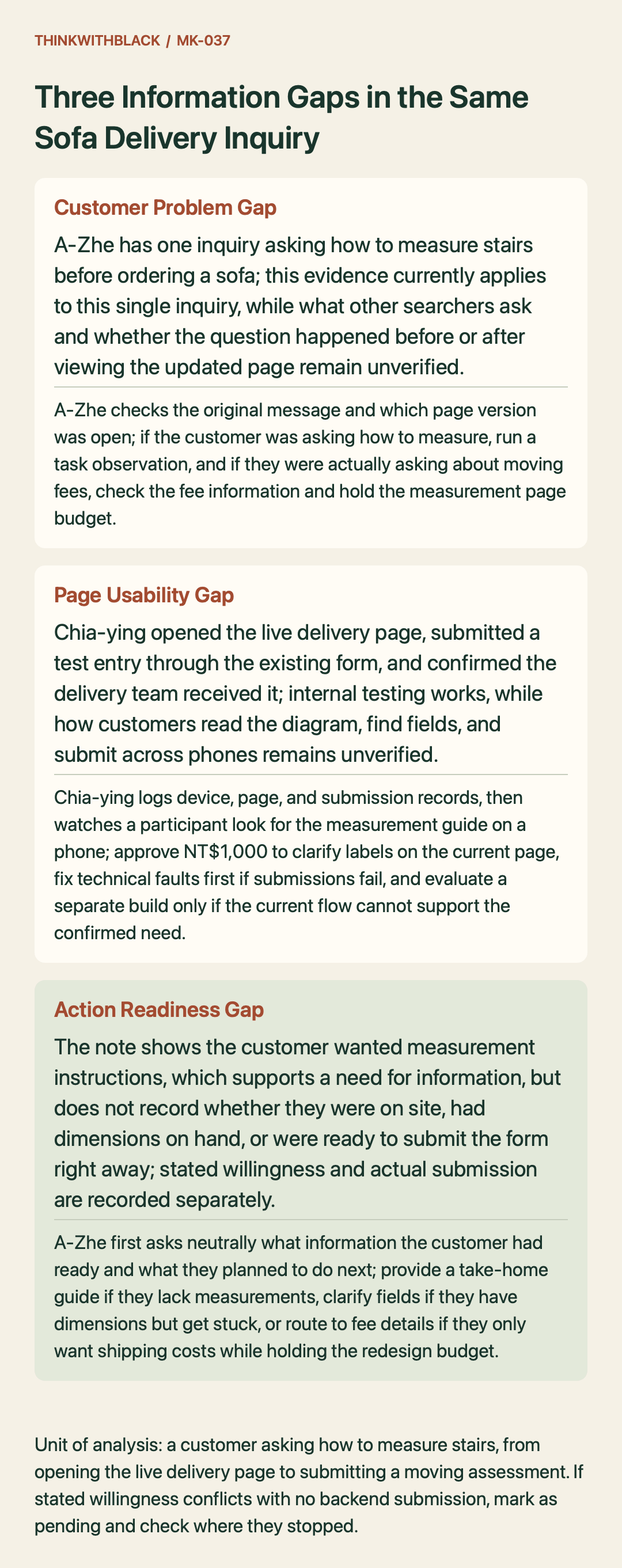
Laying out these three rows made the state of their evidence clear. The row for the customer’s problem had a definite clue, with its scope initially locked to this single inquiry. The row for the live page had passed internal testing, while customer-side reading and operation remained to be verified. The row for the immediate action taken was marked directly as insufficient evidence.[2] Chia-ying left the unverified items honestly listed as unknowns, saving the question of whether customers were getting stuck on corner dimensions for the observation session.[2][3]
When organizing evidence, two clues will sometimes point in opposite directions. If the same inquiry includes both a record that the customer said they were willing to submit and a backend log showing no submission was ever sent, classify that row as pending determination. Go back to check the customer’s situation at the time and the exact step where they stopped, leaving any reasons for refusing to fill out the form or drop-off counts blank until verified.[2] If a customer did fill in the information and the receiving end never got it, treat it first as a delivery malfunction and log it separately from the customer’s willingness to act. Marking conflicting evidence as pending determination keeps the team focused on the exact link that needs troubleshooting.[2]
How A-Zhe Asks and How Chia-ying Observes: Filling in the Decisive Evidence with Neutral Tasks
With the table filled out, Chia-ying looked for the one unknown that would change today’s approval decision.[2] Knowing which step customers were stopping at on the current page—and whether they actually had dimensions in hand to enter—would tell her whether to keep the existing page as is, spend NT$1,000 to clarify the diagram and captions, or evaluate the NT$6,000 new-build proposal. That was the only thing they needed to verify first today.
To fill in the row for the customer’s immediate action, A-Zhe used a neutral, open-ended opening when replying to the customer, reconnecting the conversation to what the customer was originally trying to do[3][4]:
“When you wanted to check on getting the sofa upstairs last time, what information had you already looked up or prepared at that point? What were you originally planning to do next?”
This phrasing finds out what information the customer already had in hand before asking about their original plan, letting them answer from their actual situation while leaving any preference for a new page to be verified through real interaction.[3][4] If the customer replies that they haven’t measured yet, A-Zhe provides a measurement guide they can take back to the site. If the customer has already measured their stairs and couldn’t find where to enter the numbers on the page, A-Zhe records which field stopped them. And if the customer explains they actually wanted to check moving fees first, A-Zhe logs the inquiry under delivery fee explanations, and the budget for revising the measurement flow stays on hold.
For the row covering the live page and form, Chia-ying set up a moderated usability testing session.[4] She asked participants to open the live delivery page on their phones and gave them a clear task scenario, leaving the form’s location for them to find on their own and letting them decide whether to submit based on what they would normally do[4]:
“You’re checking whether the sofa you picked can be carried upstairs. Using this page, please find the information you need right now and proceed the way you normally would. You can stop at any point, and please talk through what you’re looking for as you go.”
During the session, whether a participant reads the measurement guide, whether they can get the information they need, and when they are willing to fill out the form are each recorded separately.[2][4] Chia-ying watched where participants scrolled and which screen they paused on. Once a participant finished or came to a stop on their own, she asked one question aimed at the exact spot where they paused[4]:
“What were you originally trying to find right here?”
This task observation is designed specifically to surface friction points in reading and interacting with the page.[4] Chia-ying and A-Zhe also agreed upfront on the boundaries of their evidence: passing internal page testing, a customer being willing to leave their details at that moment, and ultimately completing a sofa purchase are three independent outcomes.[2][3] Task observation answers whether the current page lets customers find the measurement instructions and complete the steps smoothly, whereas purchase intent and any final increase in completed orders must be verified later against corresponding order records.[2][4]
Choosing Between NT$6,000 and NT$1,000: Factoring Verification Costs and Break-Even Thresholds Together
Why run this round of observation before approving a build? Chia-ying pulled the numbers from the quote folder and compared them the way the store actually keeps its books.
The cost of updating the delivery page the previous week was a prior outlay and is already part of the common baseline shared by both options.[1] For this round, the team scheduled user task observations and organized existing evidence to confirm the direction of the update, which carries an attributable labor cost of NT$600. That NT$600 is the team’s new verification outlay in this round of the story, and regardless of which option they choose afterward, it is counted once.
Holding ad spend, existing fixed costs, and the comparison period constant, each additional completed sofa order (net of cancellations and refunds) contributes NT$1,200 after deducting per-order variable costs such as product cost, payment processing, and delivery, and before deducting this round’s one-time page update and verification costs. Order gains are measured against the same baseline definition.
Chia-ying ran the numbers for both follow-up options on that shared baseline.
The first option is updating the existing page. If the observation confirms the current page structure works and customers only need a more clearly labeled measurement diagram or a line of field explanation, the vendor’s quote to supplement the existing page is NT$1,000. Adding this round’s NT$600 verification cost brings total new outlay to NT$1,600.
The current-period incremental profit formula is
Additional completed orders × NT$1,200 − NT$1,600At 2 additional completed orders, that comes to
2 × NT$1,200 − NT$1,600 = +NT$800The threshold to start earning more is 2 additional completed orders in the current period
The second option is building a separate page and flow. If the observation confirms the store needs to build a dedicated moving-access assessment page and submission flow as the vendor proposed, the quote is NT$6,000. Adding this round’s NT$600 verification cost brings total new outlay to NT$6,600.
The current-period incremental profit formula is
Additional completed orders × NT$1,200 − NT$6,600At 6 additional completed orders, that comes to
6 × NT$1,200 − NT$6,600 = +NT$600The threshold to start earning more is 6 additional completed orders in the current period
When both options are viable ways to solve the same confirmed need, we can also compare how they perform at the same order gain. Suppose the update brings in 2 additional completed orders:
Updating the existing page yields +NT$800 in current-period incremental profit
Building a separate page and flow yields
2 × NT$1,200 − NT$6,600 =−NT$4,200The two options differ by NT$5,000
In other words, on the premise that both options can solve the same need, building a separate page must bring in at least 5 more completed orders than updating the existing page (5 × NT$1,200 = NT$6,000, covering the NT$5,000 cost difference and coming out NT$1,000 ahead) to earn more in financial terms. If the observation confirms the current page and flow genuinely cannot support the need and building a separate flow is the only option that can get the job done, updating the existing page is no longer an equally viable alternative. In that case, evaluate the new-build option directly against its own threshold of 6 additional completed orders and whether the store can comfortably commit NT$6,600. How many additional completed orders either option will actually generate remains to be verified after launch once reliable comparison data is available.
With those numbers laid out, Chia-ying’s decision for today was clear. She approved the NT$600 verification work first and kept the live delivery page in place, having A-Zhe clarify the open inquiry while she ran the task observation. Both the NT$1,000 and NT$6,000 quotes stayed on hold until the NT$600 check brought back real evidence to decide which work to green-light.
Matching What You Uncover to the Work You Approve
So the team could act as soon as the observation wrapped up, Chia-ying wrote out the approval branches on the front page of the quote folder. You can use these same branches to check an update proposal on your own desk[2][3]:
- You find out the customer is actually asking about moving fees. If A-Zhe checks the original message and confirms the customer’s real concern is how much per-floor moving costs, shift the work to reviewing the delivery fee explanation on the site, and keep both the NT$1,000 and NT$6,000 measurement-related budgets on hold.
- You find out the customer doesn’t have the dimensions yet. If the customer wants to know whether the sofa will fit upstairs but doesn’t have their stairwell and corner measurements on hand, give them a practical measurement guide they can take back to the site so they can return to the existing page and fill in the numbers once measured. Leave the current page as is.
- You find out the customer has the dimensions, but stops at the current page’s diagram or a field caption. If the task observation shows participants can see the form and have dimensions ready, but pause while trying to interpret a corner diagram or field label, approve NT$1,000 (NT$1,600 total including this round’s verification) to clarify the diagram captions and field wording on the existing page, aiming to clear the 2-order threshold. If you still consider the NT$6,000 new-build quote at this stage—where both options can solve the problem—the new build must bring in at least 5 more completed orders than the existing-page update to be worth the extra cost.
- You find out submission fails on certain phones or has a technical bug. If the observation shows participants fill out the form fine but cannot submit, or the receiving end drops the message, have engineering or the vendor fix the submission function on the existing form first, keeping technical repairs separate from the question of building a new page.
- You find out the current page and flow genuinely cannot support the confirmed need. When observation confirms customers hit a structural barrier while trying to submit a moving assessment—such that adding diagram captions or tweaking fields on the existing page still won’t let them finish the task, and only a separate flow can remove that obstacle—evaluate the NT$6,000 new-build option (NT$6,600 total including verification) on its own merits, checking the break-even threshold of at least 6 additional completed orders against the budget the store can afford.
- You find out the current page already satisfies the immediate task. If participants can follow the live delivery page, understand how to measure, and complete what they need to do right then, keep both the NT$1,000 and NT$6,000 add-on budgets on hold.
Chia-ying signed off on the NT$600 verification task during Monday morning’s meeting. By using that approved NT$600 verification budget to check the one unknown that could change her decision, a NT$6,000 quote she might have signed on instinct now had clear conditions for moving forward.
Take One Redesign Quote on Your Desk and Fill Out These Two Tables Before You Decide
The next time you receive a quote to redesign a page, add a new flow, or rebuild a form, pick one customer path where you already have an initial clue and walk it through the two worksheets below.[2]
First, split that path into three rows—“Customer problem,” “Live page and form,” and “Immediate action taken”—and fill them into the seven-column information gap table. Put what you already have on record under “Raw Clue” and “Support / Counterexample,” write what you haven’t checked yet directly under “Unknowns,” and use “Downstream Use” to state clearly who will check it, what minimum piece of evidence they need to bring back, and which result will trigger a switch in options.[2]
| Unit of Analysis | Raw Clue | Classification Definition | Classification Result | Support / Counterexample | Unknowns | Downstream Use |
|---|---|---|---|---|---|---|
| (Enter the customer problem to verify) | (Existing customer inquiry or exact search query) | Customer problem gap: verify where this person is actually stuck | (Clue exists / Pending determination / Insufficient evidence) | (Records supporting this judgment, and what counterexample would change it) | (Unconfirmed scope or timing of the issue) | (Owner + verification action + which result holds budget vs. moves forward) |
| (Enter the existing page and form) | (Results from testing the page and receiving flow yourself) | Page usability gap: verify what the current page actually lets users do | (Passed internal testing; customer interaction to be verified) | (Functions confirmed working so far, and what counts as a technical failure) | (Whether customers actually stop at diagram captions, fields, or submission) | (Owner + neutral task observation + conditions for updating the existing page, fixing bugs, or evaluating a new build) |
| (Enter the immediate action taken) | (Customer actions recorded so far and what is left blank) | Action willingness gap: verify what step the customer is both willing and able to take right then | (Clue exists / Pending determination / Insufficient evidence) | (Separate records for verbal willingness vs. actual submission) | (Customer’s location at the time, info on hand, and concerns) | (Owner + neutral opening question + next step matched to what the customer has on hand) |
Second, plug the options you are evaluating into the budget and threshold worksheet. Enter this round’s verification cost, the add-on quote for each option, and the per-order contribution for your own product to see how many additional completed orders each option needs to start coming out ahead. When both options can solve the same confirmed need, calculate how many more orders the higher-priced option must bring in over the lower-priced option to earn more relatively. If only one option can get the job done, check that option’s break-even threshold and total outlay directly.
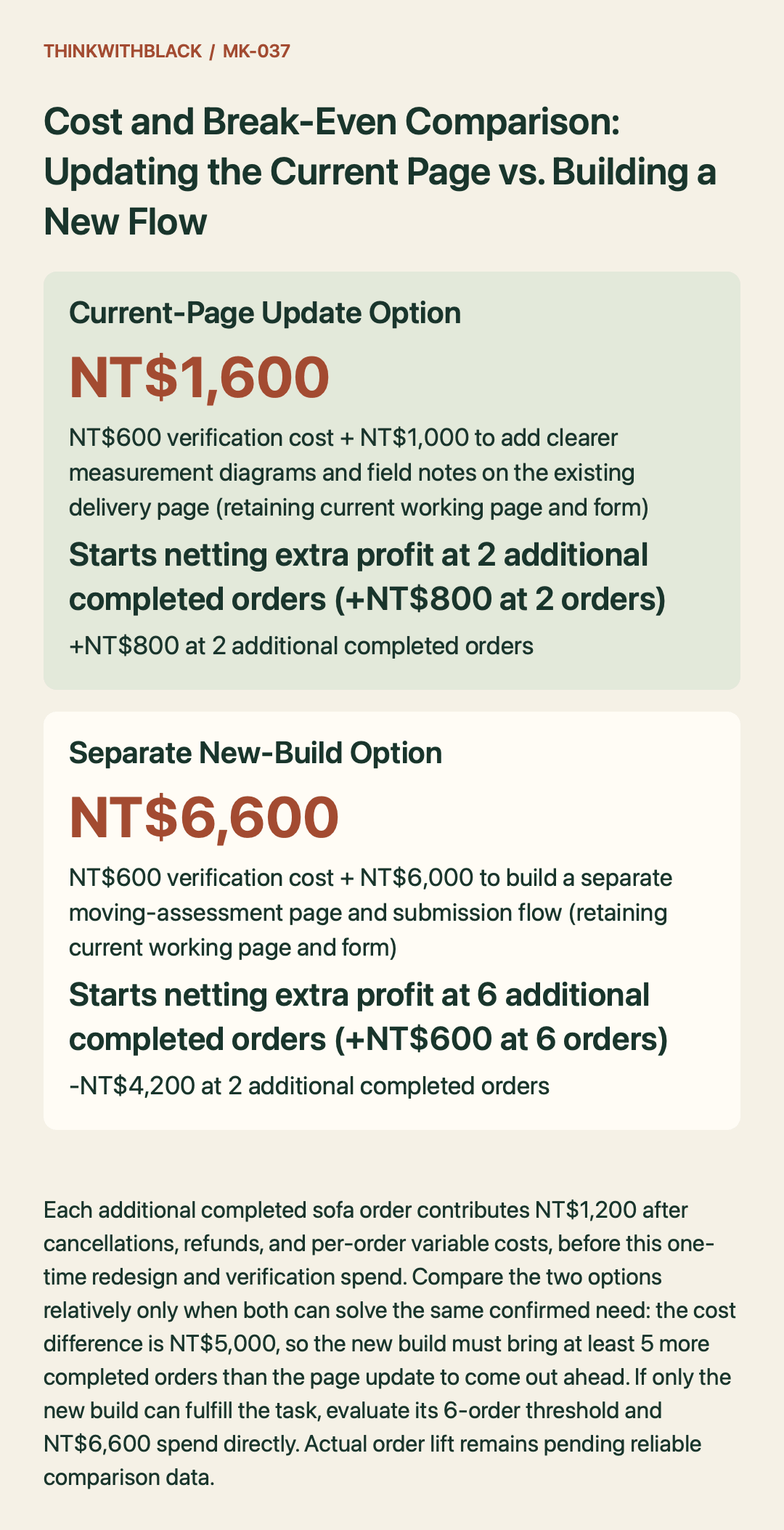
| Calculation Item | Formula and Explanation | Update Existing Page | Build Separate Page | Your Option A (To Fill) | Your Option B (To Fill) |
|---|---|---|---|---|---|
| Prior completed work outlay | Already included in the common comparison baseline; existing work is kept this round | Common baseline (keep existing page) | Common baseline (keep existing page) | ||
| New verification cost this round | User task observation and evidence organization; counted once this round | NT$600 | NT$600 | ||
| Add-on update quote this round | Quoted outlay committed only after observation confirms the need | NT$1,000 | NT$6,000 | ||
| Total new outlay this round | New verification cost + Add-on update quote |
NT$1,600 | NT$6,600 | ||
| Contribution per additional completed order | After cancellations, refunds, and per-order variable costs, before this round’s one-time outlay | NT$1,200 | NT$1,200 | ||
| Current-period incremental profit formula | Additional completed orders × Contribution per order − Total new outlay |
Orders × NT$1,200 − NT$1,600 |
Orders × NT$1,200 − NT$6,600 |
||
| Threshold to start earning more this period | Minimum additional completed orders needed for incremental profit > 0 | 2 orders (+NT$800 at 2 orders) | 6 orders (+NT$600 at 6 orders) | ||
| Outcome at the same 2 additional orders | When both options are viable, plug in 2 orders to compare current-period incremental profit | +NT$800 | −NT$4,200 (NT$5,000 difference between options) | ||
| Relative break-even threshold for higher-priced option | Additional completed orders needed to cover the cost difference when both options solve the same need (if only one option is viable, check its own break-even threshold directly) | Baseline option | When both are viable, must bring in at least 5 more orders than updating the existing page (+NT$1,000 ahead at 5 more orders) | ||
| Actual additional completed orders | Fill in after launch with reliable comparison data; remains to be verified beforehand | To be verified | To be verified | To be verified | To be verified |
We all want every dollar spent on a site update to target the exact spot where customers actually stop. Three downloadable CSV worksheets accompany this article so you can put the process to work right away. Start by downloading the three-row worked example to see how Chia-ying and A-Zhe broke down the moving inquiry, then open the seven-column blank information gap table to map your own customer path and minimum next piece of evidence, and finally use the budget and threshold worksheet to plug in your verification cost, update quotes, and per-order contribution to calculate your break-even and option-switching thresholds.
These three CSV worksheets are hands-on attachments built specifically for this article. If you want to review the full method definitions and interpretation rules for MK-037, you can download the external MK-037 method pack file or view the public MK-037 method pack on GitHub. You can also head back to the previous installment in this series, MK-036: Should Sofa Search Queries Land on a Product Page or a Delivery Page?, to see how the search intent classification and initial delivery page update were carried out.[2][1]
Before signing off on the next redesign quote that lands on your desk, ask yourself one question: which unknown, if checked today, would change your approval decision?
References
ThinkWithBlack, “Should Sofa Search Queries Land on a Product Page or a Delivery Page?” (〈沙發搜尋句該接商品頁還是配送頁?〉, MK-036). · 2026-11-18 ↩1 ↩2 ↩3 ↩4
ThinkWithBlack, MK-037 | Information Gap Interpretation public method pack. · 2026.11.18-free.1 ↩1 ↩2 ↩3 ↩4 ↩5 ↩6 ↩7 ↩8 ↩9 ↩10 ↩11 ↩12 ↩13 ↩14 ↩15 ↩16 ↩17 ↩18
Chiu Yu-ting (邱煜庭), Google Ads Lesson 1 | Understand Demand First to Know How Your Ads Should Connect (《Google Ads 第一堂|看懂需求,才知道廣告怎麼接》), slides 21, 23, and 28–30. ↩1 ↩2 ↩3 ↩4 ↩5 ↩6 ↩7 ↩8 ↩9 ↩10 ↩11 ↩12
GOV.UK Service Manual, “Using moderated usability testing.” · 2017-10-03 ↩1 ↩2 ↩3 ↩4 ↩5 ↩6 ↩7 ↩8 ↩9 ↩10
Social posts and cards