SKILL 營運解題 · MK-036
Product Page or Delivery Page? How to Match Search Intent to the Right Landing Page
Across any product category or scenario, landing page routing depends on what the searcher wants to finish right now and whether the destination page can complete that job. The four intent categories define distinct page roles. Informational queries seek answers or methods, so the page answers upfront and offers a working next step. Navigational queries name a specific brand or page, routing visitors directly there without detours. Commercial investigation queries compare alternatives, requiring specifications and constraints shown side by side. Transactional queries signal readiness to act, needing option selection, verified availability, clear terms, and working checkout. When an existing URL already addresses the immediate need and both the next step and internal handoff succeed, it can stay unchanged and serve multiple entry purposes. When a destination fits the task yet lacks specific instructions or handoff steps, updating that page suffices; building a separate page applies only when a distinct workflow cannot share an existing route. Ambiguous terms stay distinct from verified working pages and remain held under current routing with missing evidence logged until longer queries, context, or actions after landing clarify them, without premature page splits or budget shifts. Finally, flow completion must stay separate from business outcomes measured net of page, ad, and order costs, leaving early observations provisional until page tracking, sample size, and comparable controls hold.

Before Friday’s Google Search ads went live, Chia-ying was checking where her landing pages pointed—continuing the sofa store story from the previous episode. She manages both search advertising and site content for a small Taiwanese furniture store, and she had pointed every keyword containing “sofa” to the product list. That setup made sense on the surface: shoppers saw styles right away, and her team did not have to build a new page before launch.
Then A-Zhe came over from customer service to follow up on the call from that earlier story.[1] A buyer who had already picked out a sofa wanted to know what to measure on the stairs before ordering, because the building’s freight elevator was still out for repairs. A-Zhe had re-sent the delivery notes, yet the customer still could not find how or where to send back the corner measurements.
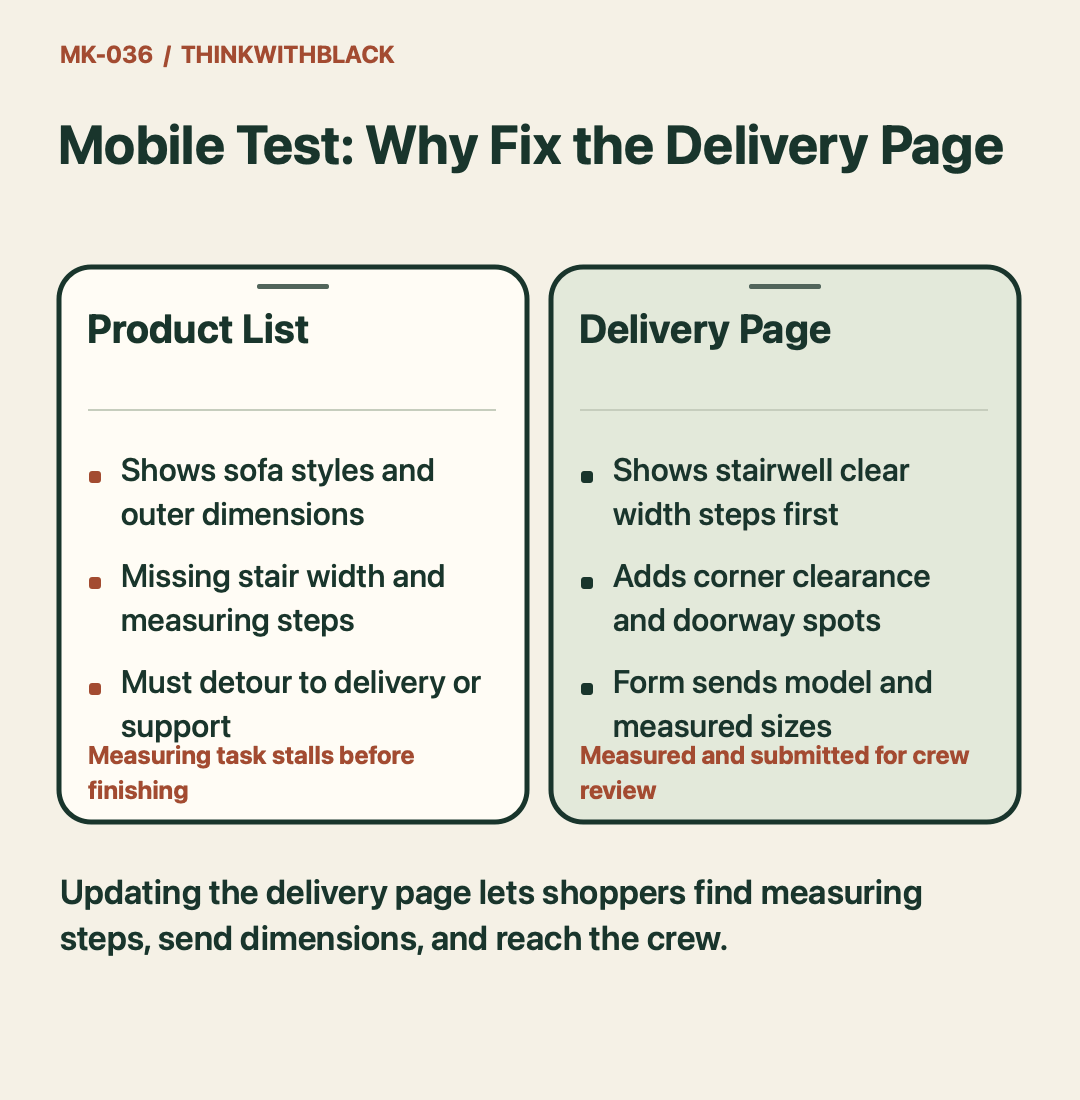
Chia-ying tried patching the product list first. She added a brief note on dimensions and delivery near the top of the page, opened it on her phone, and walked through it as if she had just searched, “What do I measure on the stairs to carry a sofa up?” The styles and outer sofa dimensions were visible, yet stairwell clear width, corner clearance, and instructions for submitting measurements were still missing—forcing a detour to the delivery page or another message to customer service. Adding one line of copy to the product list could not finish a measuring task.
She checked the existing delivery page next. It already had space for measuring instructions, and A-Zhe confirmed that submissions from its form reached the delivery crew for evaluation. At first, the fix looked straightforward: point every “sofa” keyword to the delivery page instead.
Before changing the links, she read through the other comparison phrases on her desk and paused—each pointed to a different task someone might be trying to finish. One phrase might reflect someone comparing two sofa designs, while another might point to someone ready to buy a specific model. Redirecting the entire batch to the delivery page would send both types of visitors on an unnecessary detour. Instead of moving every keyword at once, she turned to the MK-036 intent-classification method[2]: first ask what the person is trying to finish right now, then check whether the destination page actually lets them finish it.[3]
That test answers the product-page-versus-delivery-page question and covers the rest of the batch:
- Informational searches—like asking what to measure on the stairs—belong on the delivery page, once it shows the measuring steps and a working entry to submit dimensions for evaluation.
- Navigational searches—naming a specific store or page—should go straight to that exact page or section.
- Commercial investigation searches—comparing options—need a specs or comparison view where differences sit side by side.
- Transactional searches—showing clear readiness to buy—belong on a product page where shoppers can select a model, check stock and delivery coverage, and complete checkout.
- When the existing page already works: if the current URL answers the searcher’s question on the first screen and the next step succeeds end-to-end, leave that URL unchanged.
- When evidence is lacking: if a phrase is too vague to read with confidence or your team cannot verify the match yet, hold it for verification instead of guessing or splitting out a new page.
What each phrase is actually asking to finish
The classification method builds on Chiu Yu-ting’s Google Ads lecture, which separates four search behaviors—informational, navigational, commercial investigation, and transactional—from the job the landing page must do.[3] Those categories are readings of the words people type, not built-in Google Ads fields. When the wording does not support a clear call, the phrase stays open for verification rather than being forced into a bucket.[3]
Before classifying the batch, Chia-ying verified what her store actually had in place: a product list showing sofa styles and outer dimensions, customer service handling pre-order questions, and an existing delivery page connected to the delivery crew’s assessment workflow. Anything unverified—such as whether comparable specs exist across models, live stock levels, or delivery coverage for a given address—had to be flagged rather than assumed.
Chia-ying also kept each phrase’s source distinct. Only "What do I measure on the stairs to carry a sofa up?" carried over from the MK-035 candidate list, and its customer-service origin refers to the story in MK-035 rather than a real shop log.[1] The other four phrases below were added as comparison examples to test how similar sofa queries split across pages—not live ad-report or audience data. When building your own sheet, only mark a query as an actual ad-triggering search if it came from an authorized Google Ads Search Terms Report, and log customer-service transcripts, organic search observations, and post-click behavior under separate sources.[4]
Using MK-036’s structure, Chia-ying mapped five phrases from the same sofa category into a single review table—knowing that one shopper does not have to pass through all four categories before buying[2]:
| Original phrase and source | Likely task | Intent reading and basis (with counter-check) | Confirmed offer and existing page | Action | Missing evidence (unknowns) | Downstream use |
|---|---|---|---|---|---|---|
| “What do I measure on the stairs to carry a sofa up?” (public candidate carried over from the MK-035 customer-service story; not an ad report)[1] | Find out what to measure on the stairs and how to send dimensions before ordering | Informational: “what do I measure” asks for a method. Counter-check: a one-line delivery note on the product list points elsewhere instead of finishing the task | Store confirms delivery crew assessment; existing delivery page has space for stairwell width, corner clearance, and assessment form entry | Add to existing page: add measuring instructions and assessment entry to the delivery page this week | Whether mobile visitors can follow the steps and submit usable measurements | Route pre-order stair-measuring visitors to the updated delivery page so they can submit dimensions for the delivery crew to assess |
| “[Store name] delivery information page” (added comparison phrase; not from an ad report) | Reach this specific store’s delivery instructions directly | Navigational: names the store and the exact page. Counter-check: shares a destination with Row 1, yet someone using this phrase already knows where they want to go | Store confirms existing delivery page with a direct URL and section anchors | Keep existing URL: maintain direct access; may share the URL with Row 1 while keeping each entry intent clear | Only confirming the page remains live and section links jump accurately | Send navigational visitors straight to the delivery or inquiry section via direct link and anchors, keeping this entry intent distinct from Row 1 |
| “Which is better to carry upstairs, a detachable sofa or a one-piece sofa?” (added comparison phrase; not from an ad report) | Compare two sofa designs for stair access | Commercial investigation: weighs two explicit alternatives (“which is better,” “or”). Counter-check: routing straight to checkout or a delivery-only page skips the model comparison | Product list shows styles and outer dimensions, yet comparable detachable vs. one-piece specs are unconfirmed and no side-by-side table covers split structure, packaged size, and delivery limits | Check specs before routing: point to comparison content only after verifying the store carries both types with comparable data | Whether the store stocks both constructions and has comparable packaging and delivery specs | Help comparison shoppers shortlist models using a side-by-side spec table (split structure, packaged size, delivery limits) once both constructions and specs are verified |
| “Buy a three-seat detachable sofa, in stock, deliverable” (added comparison phrase; not from an ad report) | Choose an eligible model and finish purchasing | Transactional (first pass): “buy,” “in stock,” and “deliverable” signal readiness to act. Counter-check: if checkout or address-level stock fails, the intent label is right while the page fails | Requires a product page (if this specific model is carried) with model selection, live stock, delivery terms, and checkout | Verify checkout readiness on the product page: stock and delivery eligibility must reflect the live page and order system | Live stock status, serviceable delivery areas, and verified mobile checkout completion | Send ready-to-buy visitors directly to the product page to complete an order once live stock, delivery coverage, and mobile checkout are verified |
| “Sofa price” (added comparison phrase; not from an ad report) | Might be comparing prices across stores or checking one chosen model’s price | Unclear (cannot determine): a two-word phrase lacks context. Counter-check: forcing a transactional label assumes someone is ready to buy one model and misses comparison shoppers | Current setup points broad “sofa” keywords to the existing product list; no narrower offer or dedicated page is confirmed | Hold for verification: leave current routing alone; check longer search phrases, customer conversations, or post-click actions | Surrounding context, chosen model, longer query wording, or on-page behavior | Keep current routing as an observation baseline only; do not use this row to split landing pages or shift ad budget |
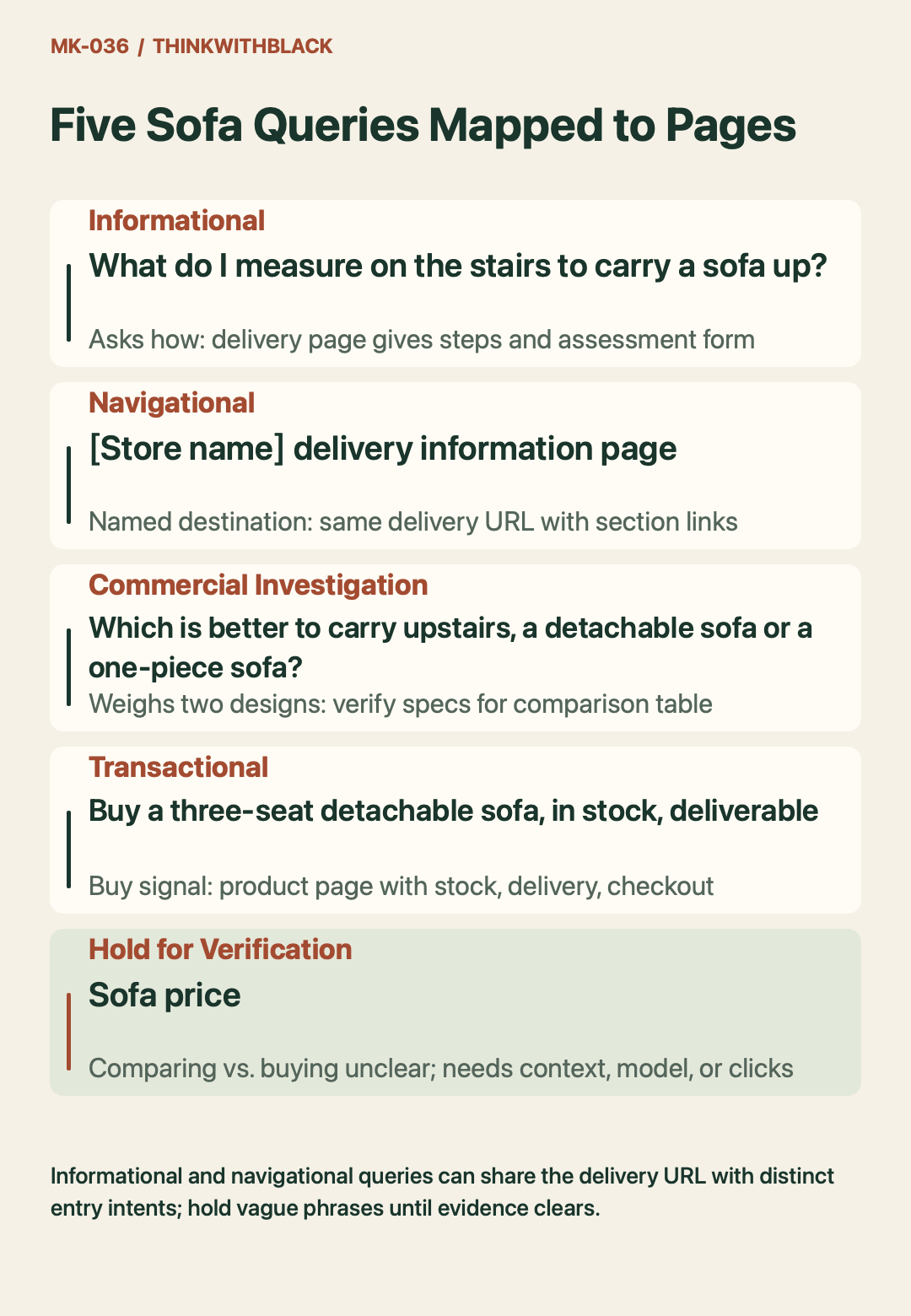
Two rows show why reading the whole phrase and its context prevents costly mistakes:
- “Sofa price” looks commercial or transactional until you test the counter-case. One person typing those two words is comparing prices across stores; another has picked a sofa and wants the final price. Because the words alone cannot separate the two, pushing the query to a buy-now page misfires for the comparison shopper. Following Slide 26 of the lecture, leaving it pending lets you inspect longer phrases and on-page behavior before changing a URL or shifting budget.[3]
- “Buy a three-seat detachable sofa, in stock, deliverable” shows that intent does not equal page readiness. The wording clearly points to a purchase, yet the visitor still hits a wall if the product page cannot confirm real stock for their postal area, state delivery conditions, and finish checkout. The intent classification describes what the searcher wants; your live page and backend still have to deliver it.
Open the page and walk through the task on your phone
A tidy table fixes nothing until you test the page in the conditions customers actually face. Chia-ying walked every row on her phone, checking three things each time: what appears on the first screen, whether the required facts are present, and whether the next step works.
Note that Row 1 (informational) and Row 2 (navigational) both land on the delivery page. Four intent categories do not require four separate URLs; what matters is that each visitor reaches the information and next action they came for without detours.
Testing the stair-measuring row side by side made the gap obvious:
- Product list with an added delivery line: Visitors see sofa styles and outer sofa dimensions, then still have to leave for the delivery page or message customer service to learn what to measure on the stairs. The extra line hints at the answer without completing the job.
- Delivery page with measuring steps and an assessment entry: Visitors see stairwell width, corner clearance, and passage dimensions, measure their space, and submit those numbers alongside the sofa model they are considering so the delivery crew can assess that order.
To see what a complete delivery guide includes, look at IKEA Taiwan’s public delivery guide. Its notes on carrying large sofas instruct shoppers to check elevator, staircase, doorway, hallway, turning, and packaged dimensions before placing an order, and state that failed deliveries caused by size restrictions may leave shipping fees with the customer.[5] Those specific measurements, terms, and fee conditions belong solely to IKEA Taiwan’s own products and policies—not to every sofa on the market and not to Chia-ying’s store. A usable delivery page borrows the clarity of showing what to inspect before ordering, grounded strictly in the store’s own delivery rules.
Keep, add, build, or hold for verification
Once you walk through each page, every row in your table falls into one of four decisions:
Keep the existing page. Choose this only when the page already answers the searcher’s question on the first screen and the next step works cleanly. Changing a working URL adds friction for no gain.
Add to the existing page. Choose this when the current page serves the same purpose and already has a working entry point, yet lacks specific information or a handoff step. Chia-ying’s stair-measuring row fits here: the delivery page is the right destination, and adding clear measuring instructions plus a clean form handoff to the delivery crew completes the path.
Build a separate page. Choose this only when the task and next step are genuinely different, real evidence shows visitors need it, and no existing page can finish the job. Because new pages cost time to build and maintain, confirm the demand comes from customer intent rather than internal guesswork.
Hold for verification. Keep this distinct from keeping a working page. When a phrase’s meaning is ambiguous—like “Sofa price”—or your team has not yet confirmed the specs, stock, or handoff needed to support the next step, leave existing routing in place temporarily strictly to avoid blind changes, record the missing evidence, and revisit once you have better data.
That second check—verifying whether your store and team can actually catch the visitor—comes straight from Slides 27–28 of the lecture.[3] Reading intent tells you where a searcher wants to go; checking the page and internal handoff keeps a clean spreadsheet from turning into a dead end.
For Friday’s launch, Chia-ying changed only one destination: she assigned a colleague to update the existing delivery page with measuring steps and an assessment entry before the weekend, conditional on passing a final mobile walk-through. The other rows stayed on their current URLs with their gaps logged.
How to verify the update and decide whether to invest more
Do not start by judging revenue. First verify on mobile that a shopper asking about stair access can land on the updated delivery page and submit usable details in one pass. Lock the definition of a qualified assessment (有效評估): the visitor submits an identifiable sofa model or spec along with the required stairwell and clearance measurements so the delivery crew can evaluate that specific case.
Keep flow indicators and business outcomes separate. You can calculate a qualified assessment completion rate—qualified submissions divided by valid landings from that category of search queries—only when traffic is cleanly grouped and reliably traced back to the exact page version. Do not treat clicks, form opens, or qualified assessments as completed sales. When page-level tracking is missing, sample sizes are small, or you lack a comparable control group, stay with usability and flow checks, treat early numbers purely as observations, and leave revenue impact as unknown.
When you do have reliable order tracking across the same test window, comparable traffic conditions, and identical cost and order definitions, check whether the update pays for itself using this conditional threshold:
(additional completed orders from the updated page × pre-ad contribution per order) − extra page cost − extra ad spend > 0
Take the conditional arithmetic under one set of figures: suppose both versions spend NT$2,000 on ads, each completed order produces NT$1,200 in pre-ad contribution (already net of per-order costs, cancellations, and refunds), and updating the existing page costs NT$600 once.
- Old version, 2 completed orders:
(2 × NT$1,200) − NT$2,000 = NT$400 - Updated page, still 2 completed orders:
(2 × NT$1,200) − NT$2,000 − NT$600 = −NT$200 - Updated page, 3 completed orders:
(3 × NT$1,200) − NT$2,000 − NT$600 = NT$1,000
Under those conditions, the updated page needs at least 1 additional completed order to finish NT$600 ahead of the old setup (NT$1,000 versus NT$400). Swap in your own ad spend, page-update cost, and contribution—making sure cancellations, refunds, and per-order costs stay deducted—before trusting any comparison.
Build your own table from real phrases
Copy the blank table below and replace the sample rows with phrases your own shoppers actually use:
| Original phrase and source | Likely task | Intent reading and basis (with counter-check) | Confirmed offer and existing page | Action | Missing evidence (unknowns) | Downstream use |
|---|---|---|---|---|---|---|
Check every row against seven concrete fields before changing a single URL:
- Confirmed product or service: State what your store actually sells or supports, and mark unconfirmed stock, specs, or service limits as unverified.
- Existing page: Name the exact live URL currently receiving the query, if one exists.
- Data source: Record whether the phrase came from customer-service transcripts, organic search observations, post-click behavior, or an authorized Google Ads Search Terms Report. Search term reports show what people actually typed to trigger your ads rather than the keywords you bid on, and they omit low-volume queries for privacy reasons—so a phrase missing from the report does not prove nobody searches it.[4]
- Supporting cues and counter-check: Cite the exact words supporting your reading alongside what could invalidate it (ambiguous wording, or a page lacking the stock or checkout proof to complete the action).
- Unknowns: List every unverified gap in query context, specs, inventory, service areas, or tracking.
- Downstream use: Note what happens after landing—such as submitting dimensions to a delivery crew, comparing models, or checking out—and which marketing workflow decision the row informs (keep, edit, build, or hold routing and budget steady).
- Action: Pick the single row worth fixing this week, walk it on a phone, and leave working pages and uncertain rows alone until evidence warrants a move.
Running the check keeps one missing delivery answer from triggering an unnecessary site-wide redirect. Update the one page that removes a verified blocker, test the full handoff on mobile, and hold everything else steady until the evidence earns the next change.
- Download the official method pack: MK-036 Search Intent Classification Pack
- Read the previous episode: MK-035: Customer Search Phrases
References
ThinkWithBlack, MK-035 (previous episode on collecting natural customer search phrases and the freight-elevator sofa delivery inquiry): https://thinkwithblack.com/blog/mk-035-natural-customer-search-phrases/ ↩1 ↩2 ↩3
ThinkWithBlack, MK-036 public method pack (
2026.11.18-free.1: four search intent categories, pending rule, table fields, and routing boundaries): https://github.com/backtrue/thinkwithblack-skill/blob/main/packs/mk-036.md (official download: https://thinkwithblack.com/marketing-skills/downloads/packs/mk-036.md) ↩1 ↩2Chiu Yu-ting (Black Chiu), Google Ads Lesson 1: Read the Need Before You Route the Ad (〈Google Ads 第一堂|看懂需求,才知道廣告怎麼接〉), Slides 7–11 (four search intent types and page jobs) and Slides 26–28 (keeping uncertain intent open and checking whether the business can receive the next step): https://docs.google.com/presentation/d/15ZOg0pX_xikpdA3FwGEoCSVgWortvCnxSe4hz4ugizg/htmlpresent ↩1 ↩2 ↩3 ↩4 ↩5
Google Ads Help, “About the search terms report” (〈關於搜尋字詞報表〉), sections on benefits and viewing the search terms report (distinguishing ad-triggering search terms from bid keywords and noting privacy omissions of low-volume queries): https://support.google.com/google-ads/answer/2472708?hl=zh-Hant ↩1 ↩2
IKEA Taiwan, “Furniture Delivery Service & Fee Guide” (〈家具配送服務及運費說明〉), section “Notes on carrying large sofas” (「大型沙發搬運注意事項」): https://www.ikea.com.tw/zh/customerservice/about-service/delivery ↩
Social posts and cards