Xiaoyun, a brand marketing planner, is staring at the second round of studio photos for a storage box on her monitor while her team waits to finalize the product page and sales materials. For the first shoot, she had listed the product's selling points—"collapsible, front-opening door"—on a shoot request form and handed it to the designer to arrange studio time. That first batch came back showing clean front and side views of the box with a few feature labels floating beside it. Her team felt the images stopped at the physical exterior and asked for a reshoot. Trying to fix the problem on her own for the second round, Xiaoyun focused her revision notes on appearance and atmosphere: she instructed the designer to swap in a home-style background, add the copy line "easy to store," and shoot from a three-quarter angle. Yet when the new files arrived this morning, the product page layout and sales deck still just showed a plastic box sitting on an indoor floor. Customers browsing the draft page had to guess when they would actually use either feature, while the cycle of booking studio time, shooting, and revising kept burning team hours.
Looking at both batches side by side, Xiaoyun realizes the bottleneck happened before anyone picked up a camera—right on her creative brief. A brief that says only "collapsible, front-opening door" and "suitable for home storage" hands the designer two structural specifications and a room style to photograph cleanly, leaving a blank where the person, their work, and the step causing them trouble should be. From the line "suitable for home storage," the designer knows the setting is a house, but still has to guess where the box sits, what goes inside it, and what the person in the frame is doing. Even when the resulting photo feels warm and lived-in, the reason to buy the product remains invisible because "home" is just a physical space; the task in the person's hands is what determines when a feature matters.
When the brief says only "for the home," pull the image back to the person's immediate task
To break out of the reshoot loop before requesting a third studio booking, Xiaoyun stops tweaking background adjectives and starts tracing the actual work a user is doing when they reach for the box. Note that all products, characters, work logs, and demonstrations in this article are hypothetical teaching materials created to show how Xiaoyun prepares a brief detailed enough to plan shots with her designer; every scenario and record is for method practice only.
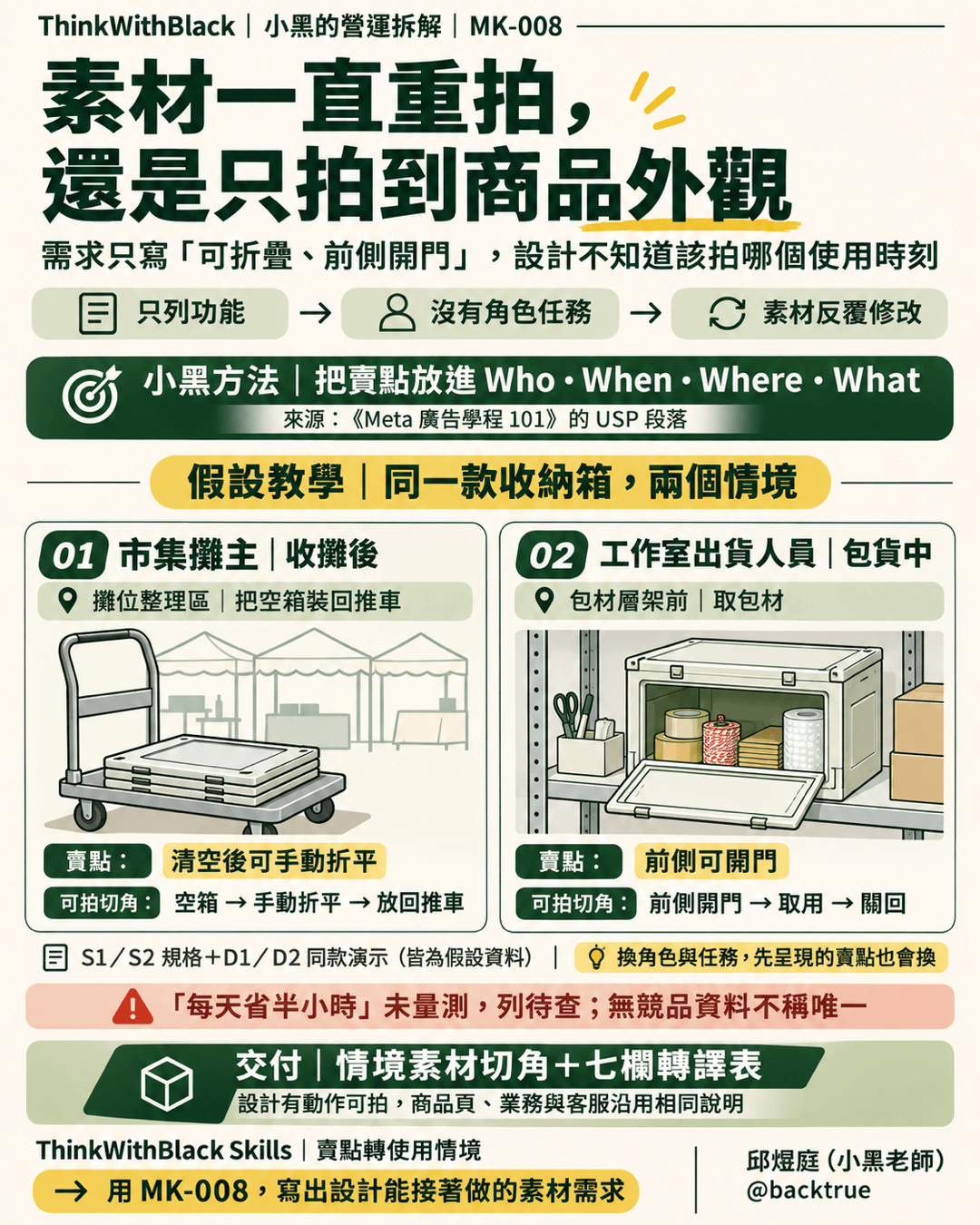
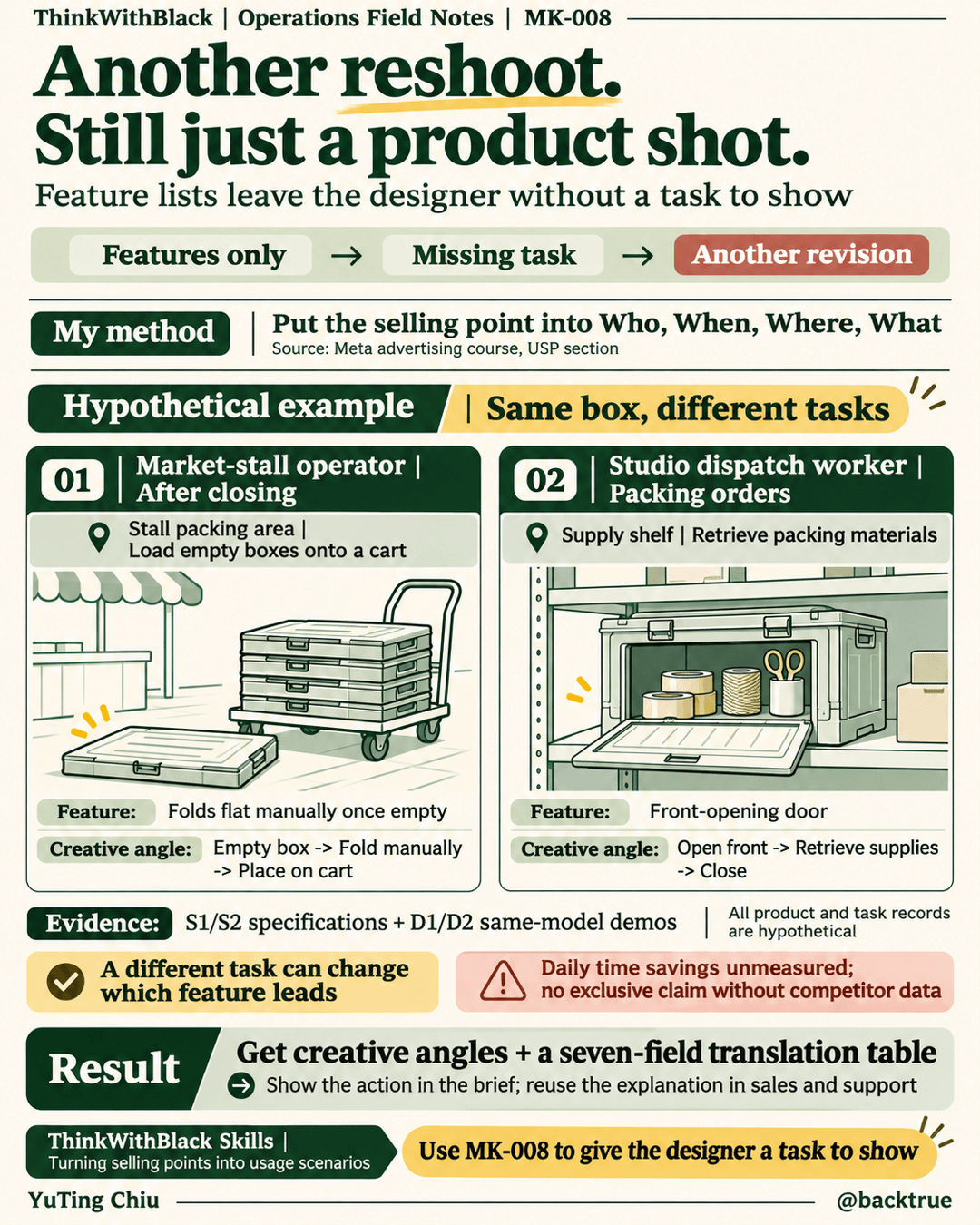
When Xiaoyun looks at how different buyers actually handle storage containers during their workday, the single "storage box" splits into two completely different working moments. One user is Azhe, a market-stall vendor who has sold or unpacked his goods at the end of the day and needs to load the empty boxes back onto his cart. Another is Xiaolin, a studio dispatch worker packing orders who needs to grab packing materials out of a box stacked on a shelf. Put the exact same storage box into those two moments, and each person faces a different workflow snag—which means the camera needs to show a different feature first. Azhe has to deal with a stack of rigid, open boxes taking up space as he loads his cart at tear-down. Xiaolin has to reach into a box still full of packing supplies while it sits stacked on a shelf.
Once the working moment is written down, Xiaoyun can immediately decide whether the primary image should show folding a box flat or opening the front door to grab supplies. The background sets the scene, while the task dictates the sequence of actions inside the frame. In its section on unique selling propositions (USPs), Meta 廣告學程 101|讓 AI 幫你投出廣告 (Meta Advertising Course 101: Let AI Run Your Ads for You) notes that a selling point must align with how a specific role builds trust and speak to a concrete audience [1]. Slide 9 of the same course handout adds that the USP is the core element to confirm the very first time you brief an AI on a product—if the AI extracts it on its own, great, and if anything is missing, you need to state your own thinking and angle clearly [1]. Applied to a creative brief, a selling point does its job by targeting a specific person's situation at a specific moment so the viewer understands the photo at a glance.
How Chiu breaks it down, and where this method comes from
To turn those observations into a repeatable studio workflow, Xiaoyun adopts MK-008, "Turning selling points into usage scenarios," which translates product specifications into creative angles built around everyday work. The Chinese MK-008 method pack traces its source to the USP section of Meta 廣告學程 101|讓 AI 幫你投出廣告. While the original course material focuses on communicating a product's unique selling proposition to AI, this Skill connects that selling point to a Persona's moment of use—turning a verbal slogan into a shootable sequence of work [2].
The method runs in three steps:
- Use Who, When, Where, and What to identify who needs to complete what specific task, at what time, and in what place.
- Place an evidence-backed USP directly into that person's immediate task and confirm that the selling point addresses their immediate problem or the change they want to achieve.
- Check whether different Personas require separate usage scenarios, keeping a dedicated angle for each role, defining each scenario explicitly as that role's way of using the product, and producing a seven-column checklist and a shoot brief a designer can execute directly [2].
In this workflow, a USP means the selling point used to communicate with a given audience right now. A brand's own specification records and operation demonstrations can support how a feature works. Copy that claims "the only," "the first," or "better than competitors," however, requires matching competitor comparison evidence. Slide 14 of the M101 handout gives three checks for a USP:
- Exclusivity: Does the USP establish a clear distinction once placed in a concrete scenario?
- Personalization: Does the subject of the copy include the user and their situation?
- Quantification: Do grounded numbers back up the claim [1]?
MK-008 turns those three checks directly into rules for sorting project data: record features, benefits, and evidence in separate columns, and log competitor comparisons or time measurements strictly according to the records actually collected. The English MK-008 method pack preserves the exact same three-step method and seven-column delivery structure.
This setup saves reshoot budget because it shifts the team's discussion from "how do we make this feature look good?" to "when does this person need this feature?" When Xiaoyun reviews a concept with the designer, she can point to the exact step in the user's task and decide which precondition the camera needs to catch first and which operating action comes next. Revisions and sign-offs now share the same checklist.
one storage box, two working moments
Before filling out the scenario tables, Xiaoyun takes inventory of the raw product specs, demo videos, and draft claims she actually has in her project folder:
- Specification S1: "Folds flat manually once emptied."
- Specification S2: "Front panel opens as a door."
- Demonstration D1: Shows an operator emptying the same model of box, folding it flat by hand, and loading it onto a cart.
- Demonstration D2: Shows the box sitting on a packing-supply shelf while an operator opens the front door, pulls out packing materials, and closes the door.
Inspecting her files closely, Xiaoyun hits a key evidence boundary: her current records cover only those two specifications and two demonstration videos, while before-and-after work-time measurements and competitor comparisons have not been collected yet [3]. Earlier copy drafts included the phrase "saves half an hour every day," and she cannot tell from internal specs alone whether competitor boxes offer the same mechanisms. Rather than guessing or letting unverified claims slip into the shoot script, she logs those gaps explicitly.
Following Step 1 of MK-008, Xiaoyun maps out the working moments and existing routines for the two roles—market-stall vendor Azhe (P-A) and studio dispatch worker Xiaolin (P-B):
| Role | Who | When | Where | What: task to complete and current snag |
|---|---|---|---|---|
| P-A | Market-stall vendor (Azhe) | After closing the stall, once all goods are removed | Stall packing area | Load empty boxes onto the cart; previously the empty boxes stayed expanded and still took up room while loading |
| P-B | Studio dispatch worker (Xiaolin) | While pulling packing supplies to pack orders | In front of the packing-supply shelf | Pull packing supplies from the box; previously had to lift the whole box down from the shelf to open the top lid |
Reading across P-A's row gives Azhe's shoot angle a clear cause-and-effect sequence: the camera starts on the empty boxes sitting in the stall's packing area after closing, shows clearly that the inside of the box is empty, and then follows Azhe as he folds the boxes flat by hand and stacks them onto his cart. Folding the box solves the space problem right at tear-down, and showing the empty interior on camera communicates the operating condition ("must be emptied before folding flat") without needing extra fine print.
Xiaolin's (P-B) sequence starts at the moment she reaches for packing materials in the studio: she stands in front of the supply shelf, opens the front door of the box, pulls out packing material, and clicks the door shut. Because the box is still full of supplies during packing, front access spares her from lifting the entire box off the shelf just to pop the top lid. The folding feature is saved for a secondary section showing how to store the box once the supplies run out, keeping the hero shot focused on shelf access.
In these two moments, the same storage box puts a different feature in the lead role—and each feature brings its own precondition that must show up on camera. With this first table done, Xiaoyun can show her team that revising the creative isn't about swapping room decor; it's about matching the shot to the user's task, action, and operating conditions.
The seven-column table puts scenario, selling point, and evidence in one brief
Once the two roles and their tasks are set, Xiaoyun organizes her notes into MK-008's seven required columns: Factual feature, Customer task, Tangible benefit, Basis for comparison, Suitable angle, Lead / Supporting / To investigate, and Reason. Every row must trace back to the specifications and demonstrations on hand, recording only original evidence, intermediate conclusions derived through the method, and items explicitly flagged as "To investigate." That layout lets the designer grasp the visual angle immediately and lets the reviewing manager verify the evidence behind every movement in the script [2].
| Factual feature | Customer task | Tangible benefit | Basis for comparison | Suitable angle | Lead / Supporting / To investigate | Reason |
|---|---|---|---|---|---|---|
| S1: folds flat manually once emptied | P-A: load empty boxes onto the cart after closing | Fold empty boxes flat and stack them together | P-A's previous expanded-box routine and D1; competitors unknown | Empty boxes at closing → fold flat manually → load onto cart | Lead | S1 and D1 support this sequence; retain the empty-first condition |
| S2: front-opening door | P-B: pull packing supplies from the shelf while packing | Open the front door on the shelf, grab supplies, and close it | P-B's previous lift-down-and-open-lid routine and D2 | Open door at shelf → pull supplies → close door | Lead | S2 and D2 support this placement and retrieval method |
| S1: folds flat manually once emptied | P-B: packing orders, with supplies still inside the box | Folding applies only after the box has been emptied | S1's precondition vs. P-B's current state | Place in a secondary section on post-use storage | Supporting | P-B is pulling supplies right now; lead with front access first |
| Draft claim: saves half an hour every day | P-A, P-B: want to cut down tear-down or retrieval time | Time saved is unknown | No before-and-after work-time records | Show the verified physical actions first | To investigate | A demo video proves the motion works, not a daily time-saved figure |
The "Lead," "Supporting," and "To investigate" labels in column six guide how the team allocates shoot budget and page real estate:
- Lead marks the primary visual to show first for that persona, chosen because the customer's immediate task matches existing demonstrations D1 and D2. Ads and landing sections aimed at Azhe open with S1 (folding flat and loading the cart); assets aimed at Xiaolin open with S2 (opening the front door on the shelf).
- Supporting (row three) logs what happens when S1 is checked against Xiaolin's active packing task. Because her box is still full of supplies and S1 requires an empty box to fold, folding moves down the page into a secondary "how to store after emptying" block, keeping the hero visual focused on grabbing supplies.
- To investigate (row four) catches a claim that frequently appears in early copy drafts: "saves half an hour every day." Checking her files, Xiaoyun sees she has demos D1 and D2 showing the motions work, but no before-and-after time logs. A demo video alone cannot prove a daily time savings of 30 minutes, so the claim stays on hold. For the current shoot, the team shows the verified actions. If they want to run "saves 30 minutes a day" as a lead headline later, their next step is to time Azhe's tear-down and Xiaolin's order packing before and after switching boxes, then upgrade the row once measured data is in hand. Similarly, deciding which persona represents a larger market or converts better requires pairing these angles with audience-sizing data or live ad tests when setting media budgets.
Hand the designer a brief tied directly to the task
With the seven-column table checked, Xiaoyun translates the approved angles into two shoot briefs the designer can take straight to set, sparing the team the cost of reshooting the same product against new backgrounds:
- Shoot brief for market-stall vendor Azhe (P-A): "Market stall at closing time; all merchandise has been removed. Shoot the empty boxes left in the stall packing area. The operator first checks that the box is empty, folds it flat by hand, and loads the folded boxes together onto a cart. Main message: compacting empty boxes after closing" [3].
- Shoot brief for studio dispatch worker Xiaolin (P-B): "Studio order-packing station; the supply box sits on a shelf matching the setup in demonstration D2. Shoot the operator opening the front door of the box on the shelf, pulling out packing materials, and closing the door. Main message: front access while stacked on a shelf" [3].
Both briefs spell out the role, timing, setting, continuous action, and main takeaway. The designer knows how to dress the set, block the talent, and sequence the shots, and at delivery everyone can check the footage against the brief to confirm key preconditions—checking that the box is empty before folding, or keeping the box on the shelf while opening the front door—made it into the cut. Once the visuals go live, the product page can follow the exact same two-part structure, and sales and customer support teams know which clip to show when answering questions from a market vendor versus a warehouse packer. Ads, landing pages, and sales replies stay aligned.
Before booking the shoot and again when reviewing deliverables, Xiaoyun and her team check the work against three questions:
- Are the person and task unmistakable on screen? A viewer should be able to state who is doing what, and at what step of their work.
- Are the preconditions for the spec visible in the shot? For example, does the camera show the box is empty before it folds flat, and is the box sitting on a shelf when the front door opens?
- Does every benefit in the copy trace back to a spec or demo in the seven-column table? Claims marked "To investigate" stay on an internal tracking list until measured; published copy uses only verified facts.
This entire decision framework holds under three operating conditions; if any one of them changes, Xiaoyun and her team must recheck the table and update the angle and copy claim before shooting:
- The task or product placement changes: If a studio dispatch worker moves the box from a shelf to an open desktop where lifting the top lid is effortless, the original reason for opening the front door on a shelf disappears and has to be reverified, prompting the team to re-aim the shot at desktop workflow snags.
- The product version updates: If a product revision alters or removes the front-opening door structure—such as replacing it with a standard top-lid design—every asset built on specification S2 and demonstration D2 gets flagged for replacement and must be updated with demos of the new model at the same time.
- The claim crosses the boundary of existing evidence: Specifications and demonstrations on hand can explain how a feature works and its immediate benefit. Claiming the product is the only one on the market, first in its industry, or saves a specific number of work hours per day requires competitor comparison data or before-and-after time measurements first.
A background is just a location. Every product revision or audience shift comes back to the same three checks—task, specification, and evidence—so managers can make an accurate decision before booking studio time and ensure production budget goes toward shots that help customers make a buying decision.
Use MK-008 to organize your next creative brief
Before writing your next shoot or creative brief, gather your product specifications, existing demo videos, competitor data, and notes on how your target audience works. Leave any unverified numbers clearly marked as unknown, and run your materials through AI with this prompt:
Please read MK-008 first. Use Who, When, Where, and What to map out the moments when the product is needed, connect evidence-backed selling points to each role's immediate task, and deliver the seven-column table along with creative angles ready to hand to a designer. Separate features, benefits, and evidence, retain operating preconditions, do not treat scenario hypotheses as real customer records, and mark any missing competitor comparisons or performance numbers as to investigate.
This prompt instructs the AI to establish the user's working moment before slotting in a selling point, keep features, benefits, and evidence in separate columns, and flag missing data as "To investigate." Once the AI generates the seven-column table and draft brief, audit the output against your raw files:
- Confirm every row traces back to an actual specification, demonstration, and user task.
- Confirm every angle marked "Lead" is the first action needed in that scenario.
- Confirm unverified claims remain in the "To investigate" column rather than slipping into final copy.
Once all three checks pass, send the brief to your designer. If a column comes up short, adjust the angle or run the measurement while you are still working in the table—before paying for a reshoot.
You can visit ThinkWithBlack Skills now to download the complete Chinese MK-008 method pack (or grab the English MK-008 method pack). If this is your first time using the library, download the Chinese INDEX.md (or English INDEX.md) first so your AI can help pick the right method, then upload the full method pack alongside your product files and follow the full operating instructions to build your next brief around what your customer is actually doing.
Bring your data into MK-008
- Download the MK-008 method pack · Download the English MK-008 method pack
- First time? Download the index, let the AI select the method, then upload the complete method pack with your data for this task: Download the INDEX.md index · Download the English INDEX.md · See full operating instructions
This Skill on social media
Choose a platform to view the infographic and post for this Skill:
References
- Meta廣告學程 101|讓 AI 幫你投出廣告 (Slides 9, 13, 14). Meta Advertising Course 101; method draft marked as reviewed 2026-09-19.
- MK-008|賣點轉使用情境 (Turning selling points into usage scenarios). ThinkWithBlack Skills, v0.3 method draft.
- 素材拍了又重拍,還是只在展示外觀:用 MK-008 把賣點放回使用情境 (English version: Another reshoot, still just a product shot: use MK-008 to turn selling points into usage scenarios). YuTing Chiu · ThinkWithBlack, 2026-11-04.
YuTing Chiu · @backtrue · ThinkWithBlack
About this Skill article: Author background and courses
Explore more Skill articles by operational problem → (/marketing-skills/articles/)