Warehouse worker A-Jie is switching batches for the same label, a task that originally meant retyping eight fields—item name, item number, specification, unit, warehouse, storage location, batch number, and inbound date—and checking the last two against the receiving slip.
The sales presentation listed template saving, print preview, and an ABS body; later, more specifications were added and the name was changed to "Smart Template," while the line "saving two hours a day, zero mislabeling" was a draft without supporting evidence. Customers still need to evaluate it, and the product page, the presentation, and customer service replies were revised accordingly.
Returning to the operation, A-Jie works with a frequently used template that carries over the first six fields, refills and verifies the last two, and previews before printing, checking again whenever a version changes. Whether time is saved or mislabeling occurs must still be tested separately.
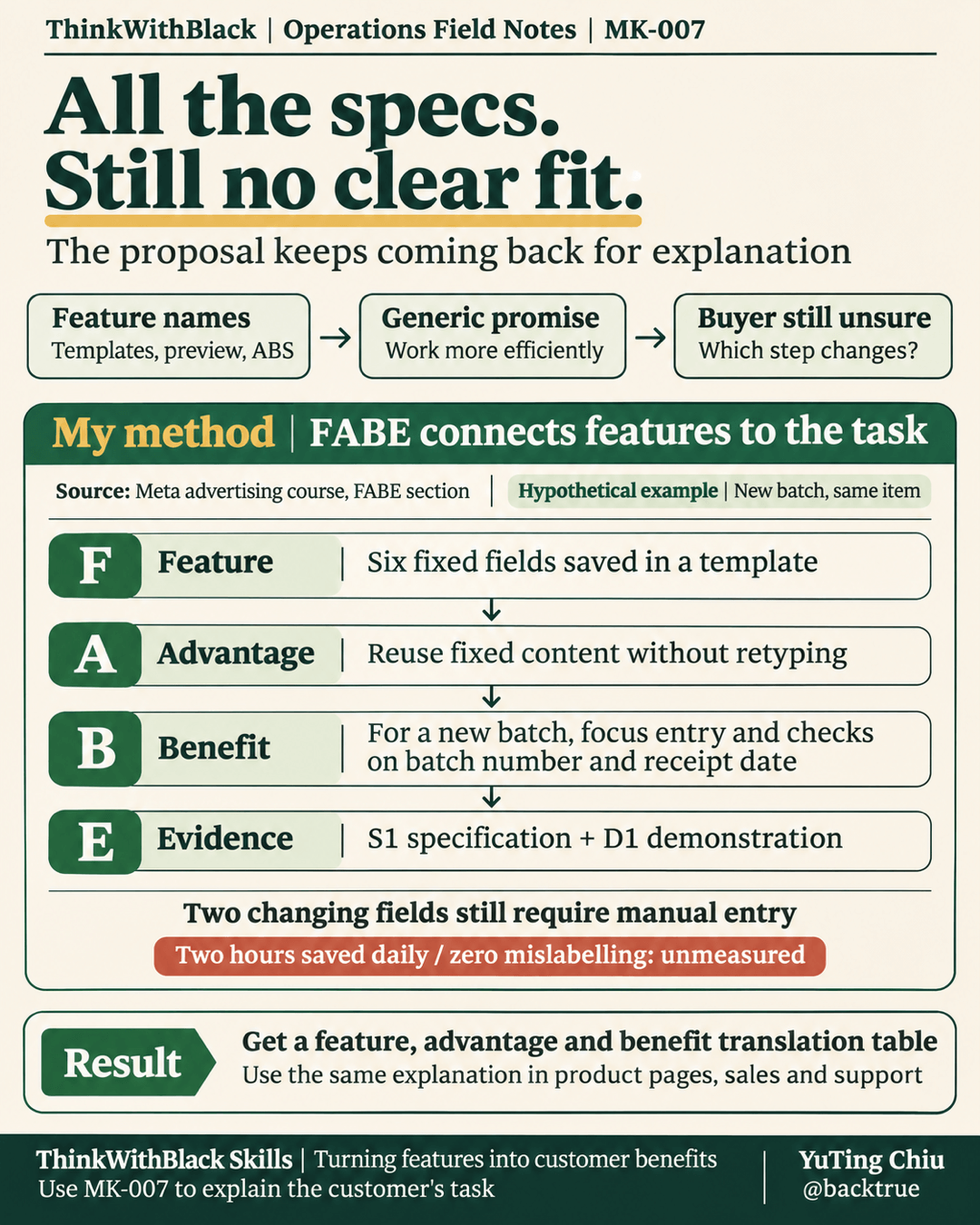
Why does the pitch still stall when "template saving" becomes "smart template"?
On that warehouse floor where the worker prints batch labels for the same item every day, a rep handing over a slide that says "supports template saving, print preview, ABS housing" and "makes work more efficient," or renaming the feature "smart template," gives the operator nothing more than a new adjective. Adjectives tell the operator very little. The worker still needs to know: once I open a template, which fields are already filled in, which ones do I still have to type myself, and what do I need to check before hitting print?
To connect product specs to the customer's job, the team first has to map out how the worker currently handles the task: out of the eight fields typed every day, which ones stay identical on every label, which ones change with each batch, and what paperwork must be checked against which fields before printing. Once those on-site conditions are spelled out, product features have a concrete place to land. The same template-saving feature has an obvious operational use for someone printing labels for the same item batch after batch; for someone whose label content changes almost entirely every time, you have to inspect their workflow separately to see what actually repeats.
To help the customer decide on the spot and keep sales and marketing from redoing the same work, the team needs to rewrite a feature name like "template saving" into a description that fits directly into the on-site workflow: "When switching batches for the same item, open a saved template to keep six fixed fields such as item name, enter and check this batch's batch number and receipt date, then preview and print."
Try a quick test on your own spec sheet: cover up the feature names and read only the adjectives and slogans. Can a buyer point straight to the step in their current routine that would change? If they still have to guess how the operation works, your copy is stuck at the feature name and needs the working conditions and step-by-step changes filled in.
How does Blackie break this down, and where does the method come from?
When the team needs a structured way to replace vague adjectives with step-by-step workflow changes, MK-007 ("Turn features into customer benefits") handles this translation. It walks each feature through four stages in order—Feature, Advantage, Benefit, and Evidence. First, it keeps the feature the product actually has. Next, it explains which step that feature changes under known conditions, and describes the concrete change in the user's work. Finally, it pairs the claim with supporting evidence and delivers a seven-column translation table—covering the factual feature, customer task, tangible benefit, basis for comparison, recommended angle, verification status (marked as Lead, Supporting, or Pending verification), and reason—so the team carries the required evidence and usage conditions into every pitch and piece of copy.
The complete Chinese MK-007 method pack traces its framework to the FABE section of Meta 廣告學程 101|讓 AI 幫你投出廣告 (Meta Advertising Course 101: Let AI Run Your Ads for You). The original method combines buyer personas with FABE to connect product facts to the daily tasks a target buyer cares about. The complete English method pack keeps the same three-step translation and seven-column delivery structure.
FABE stands for Feature, Advantage, Benefit, and Evidence. On slide 73 of the original course deck, a Feature is a quantifiable specification or distinctive trait of a product; an Advantage is its relative edge over current practices or competing options; a Benefit is the concrete gain or workflow change for a specific role; and Evidence is the proof, case study, or data that builds trust. Slide 74 gives a before-and-after example: a line that originally read "Ingredients: carbonated water, high-fructose corn syrup" is broken into four parts and rewritten as "330ml ice-cold fizz (Feature), with finer bubbles and a smoother mouthfeel than regular cola (Advantage), quenching your thirst and waking you up on a hot afternoon (Benefit), winner of a 2024 International Taste Award Gold Medal (Evidence)." The example takes a single product fact and lays out what it has, what difference that makes, what the person experiences, and the third-party proof behind it.
MK-007 distills this four-part structure into three actionable steps:
- Use FABE to turn a verified Feature into an Advantage under known conditions, then connect it to a Benefit that matters to a specific role.
- When writing the Benefit, describe the concrete change in that person's work steps or outcome rather than swapping in synonyms for the feature.
- Add Evidence to back the claim, letting the scope of your existing proof set the strength of what you promise.
These three steps reverse the usual order of proposal prep. Instead of starting with an inventory of product specs, the team first writes down how the customer currently does the job and which step changes, then checks how much of that claim the product manual and live demo can actually support. Turning "has a save function" into "makes saving easier" leaves the message stuck on the surface of the feature. Spelling out which fixed fields carry over and which changing fields still require manual entry lets the buyer picture the tool inside their own workflow.
The method pack also separates features, benefits, and evidence during review. Product spec sheets prove what the tool itself can do, but if a pitch or ad claims to be "the only," "the first," or "better than competitors," you need matching competitor data to back that up. When you only have your own product specs, sticking to what the tool does inside the customer's workflow is the safest way to communicate.
connecting label-tool features to batch changes
The team puts the product sheet, demo, and work records side by side to see which steps the tool changes.
In this exercise, the team starts with five source items:
- P1 Work record: Documents the target user's (a warehouse worker's) daily routine. The worker prints different batch labels for the same item every day. Previously, every batch change required typing eight fields one by one. Six fields—item name, item code, specification, unit, warehouse, and storage location—stay the same across batches. The other two—batch number and receipt date—must be typed manually from the incoming shipment paperwork and checked before printing.
- S1 Product sheet: States that the label tool can save templates for frequently used fields.
- S2 Product sheet: States that label content can be previewed before printing.
- S3 Product sheet: States only that the body is made of ABS plastic.
- D1 Live demo: Recorded on the same software version covered in the manual. When the operator opens a saved template, the six fixed fields stay filled in on screen while the batch number and receipt date remain blank. The operator types those two fields by hand, clicks preview to check the screen, and sends the label to print.
While reviewing these five items, the team also defines the boundaries of its evidence: the file contains only their own product and a single workflow scenario, with no competitor data, no time-study measurements, and no mislabel-rate tests. Every translation that follows therefore rests strictly on the eight known fields and the steps shown in D1, holding off on competitor comparisons, time savings, and error rates until real measurements are available.
From feature to benefit: which step in the middle needs to be spelled out?
With P1, S1, S2, S3, and D1 on the table, the team maps each feature against the actual workflow.
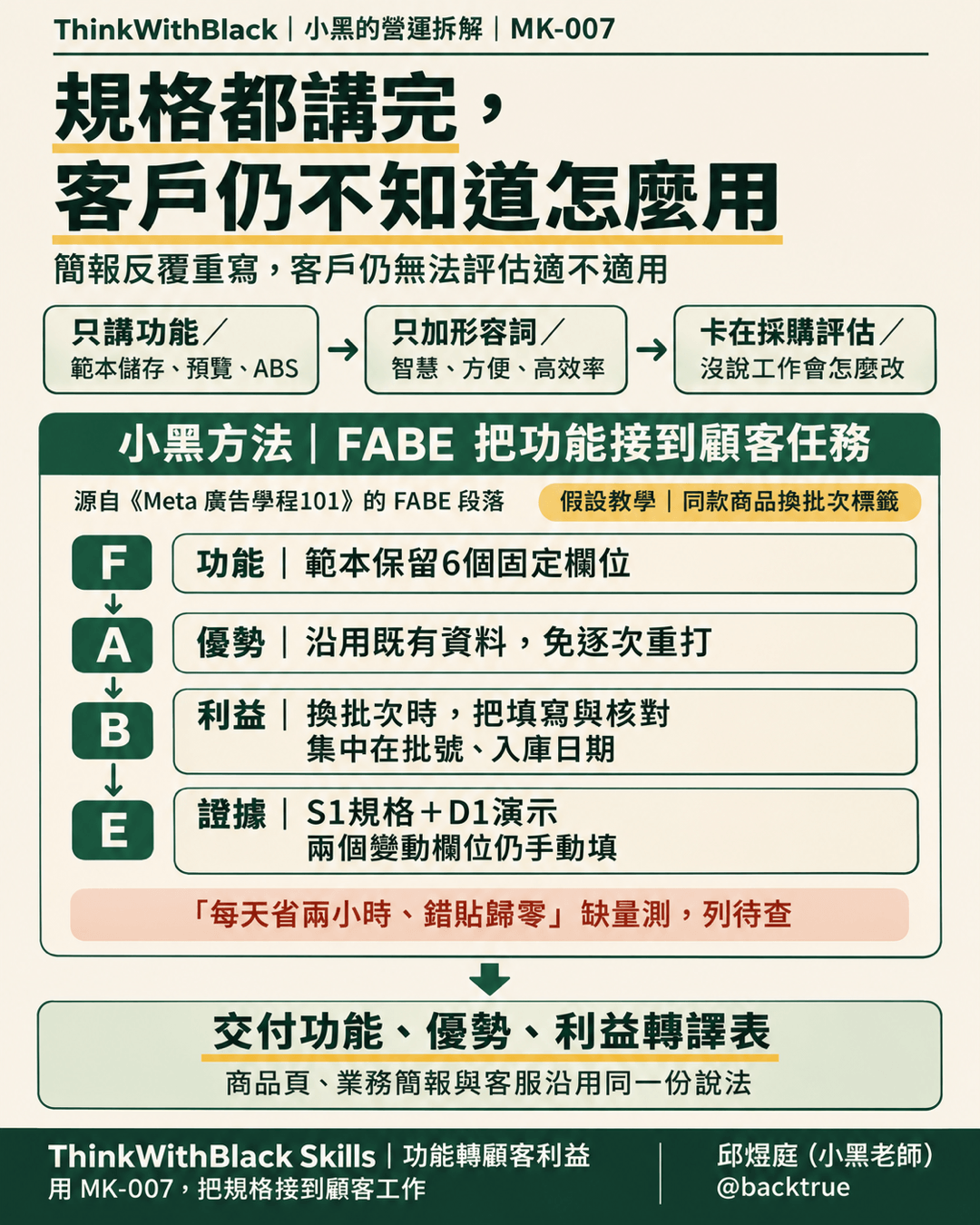
Start with the "template saving" chain. The product's F (Feature) is "saves templates for frequently used fields." Placed inside the operating environment of D1, its A (Advantage) is: "When opening an existing template, the user keeps fixed data—item name, item code, specification, unit, warehouse, and storage location—without retyping those six fields each time." Connected back to the warehouse worker's batch-change job in P1, the B (Benefit) becomes: "When printing a new batch, reuse the six fixed fields and focus data entry and checking on the two fields that change: batch number and receipt date."
Written this way, the benefit speaks directly to the daily batch-change routine while staying honest about what the operator still has to do by hand. The template holds onto the six fixed fields, while the batch number and receipt date still require manual entry. Because D1 shows a workflow built around manual fill-in and screen preview, the product page and sales deck place "reuse six fixed fields" and "manually enter and check two fields" side by side so the buyer can see the division of labor immediately.
The E (Evidence) backing this chain combines S1's spec sheet with D1's live operation. Together, they prove that the six fixed fields carry over without retyping. By contrast, a line the team jotted down during brainstorming—"saves two hours a day and cuts mislabeling to zero"—requires before-and-after time logs and error tracking that do not exist yet. That claim goes into Pending verification so customer communication stays focused on verified workflow changes.
Now look at the second chain, "print preview." Its F (Feature) is "previews labels before printing." In the workflow, its A (Advantage) is "shows the full label content on screen before outputting a physical sticker." Tied back to the checking requirement in P1, the B (Benefit) is: "The warehouse worker can hold the incoming shipment paperwork and check the newly typed batch number and receipt date against the screen before sending the job to print."
This phrasing defines the exact handoff between tool and operator: print preview gives the worker a chance to check entries against paper records before printing. Stating the benefit as "check against batch paperwork on screen before output" gives sales reps a clear action to invite prospects to try during a live demo, and gives customer support a consistent explanation for user inquiries.
The seven-column table for copywriters and sales reps
Putting these feature chains and evidence checks into MK-007's seven-column format gives the team a shared translation table across departments:
| Factual feature | Customer task | Tangible benefit | Basis for comparison | Recommended angle | Lead / Supporting / Pending verification | Reason |
|---|---|---|---|---|---|---|
| S1: Saves templates for common fields | P1: Print new batch labels for the same item | Reuse six fixed fields; focus entry and checking on batch number and receipt date | D1 compared against P1's original entry steps; competitors unknown | Switch batches without retyping fixed data each time | Lead | S1 and D1 confirm field reuse; two changing fields still require manual entry |
| S2: Previews before printing | P1: Check current batch data before printing | Compare screen against batch paperwork before output to verify batch number and receipt date | S2 and D1 operating steps; mislabel rate unmeasured | Check this batch's entries before printing | Supporting | Supports manual checking; does not automatically prevent errors |
| S3: ABS housing | P1 lists no material-related problems | Benefit for this workflow is unknown | Material name only; no durability or drop tests | Keep on spec sheet; check on-site use conditions later | Pending verification | Cannot claim drop resistance or durability from the material name alone |
| Draft claim: Saves two hours a day, zero mislabels | Wants faster labeling and fewer mislabeled items | Effect not yet measured | No before-and-after time logs or mislabel records | Re-evaluate after collecting test data | Pending verification | D1 demo alone does not prove either outcome |
Marking an item as "Lead" in this table carries a clear business threshold: the claim is backed by existing evidence (S1, D1) and answers the target buyer's core task (P1: printing new batch labels for the same item). When a rep uses this line in a pitch and the buyer asks how it works, the rep can pull up the D1 demo on the spot to show it.
Whether you can lead with this translation in a real pitch depends on three conditions:
- Matching on-site workflow premise: The customer's on-site workflow must match the premise of "six fixed fields and two fields that change per batch." If every label has completely different content, you need to go back to the site, see which steps actually repeat, and rebuild the link from Feature to Advantage to Benefit.
- Matching software version behavior: The software version in use must actually retain those six fixed fields when opening a saved template. If an update changes how fields are retained, every proposal, product page, and support script built on "keeping six fixed fields such as item name" must be rewritten together.
- Existing documentation or same-version live demo: Any lead claim must be backed by existing documentation or a live demo on the same version. Claims like "saves two hours a day and eliminates mislabeling" stay marked as Pending verification until you have before-and-after time records and measured mislabel rates. Only upgrade them to Lead once the data is in; if the test results differ, keep the old record and rewrite the claim.
In the rest of the table, S2 ("Previews before printing") is marked "Supporting" and pairs with S1 to walk through the complete batch-change and manual-check routine. S3 ("ABS housing") is a genuine spec, but P1 records no customer difficulties involving casing material, drops, or warehouse conditions, and the team has only the material name without test reports. The decision is to keep ABS housing on the basic spec sheet while marking its benefit translation as "Pending verification"—a reminder to ask warehouse staff whether equipment wear is an actual pain point and to gather test data before making durability claims.
The bottom row—"Saves two hours a day, zero mislabels"—is the kind of line marketing and sales teams routinely write into early drafts. Putting it into the seven-column table shows how it differs from the first row: D1 proves the operator skips typing six fields, whereas claiming "two hours saved" and "zero mislabels" requires timing actual warehouse runs before and after adoption and logging label errors over time. Marking this row "Pending verification" separates verified workflow changes from unmeasured quantitative outcomes, keeping the pitch grounded while showing the team what data to collect in future customer trials.
How does this translation fix the stalled pitch?
Compare the original slides that said "template saving" and "smart template" with the version revised through MK-007 and checked against the seven-column table. Sales and copywriting can now replace the main pitch line with:
"When switching batches for the same item, open a saved template to keep six fixed fields such as item name, enter and check this batch's batch number and receipt date, then preview and print."
Brought into a live meeting, that single sentence changes how four roles work and make decisions:
- The buyer (warehouse staff and procurement): Sees the exact sequence of steps inside their daily routine, knows which six fields no longer need retyping, and knows which two fields still require manual entry and a paperwork check—allowing them to judge right away whether the tool fits.
- Sales: Gets a concrete live-demo script. Open the template, point to the six fixed fields already filled in on screen, point to the blank batch number and receipt date fields, and invite the prospect to type those two entries and click preview. Abstract "efficiency" becomes a visible, hands-on operation.
- Design: Can structure product pages and instructional graphics (like the hypothetical walkthrough diagram above) directly around the sentence, splitting the visual layout into a "fixed reuse zone (six fields)" and a "per-batch manual entry and check zone (two fields)." This also follows slide 84 of the original course deck on ad creative preparation: lead with the value proposition in the primary copy, structured with three-line formatting and FABE.
- Customer support: Uses the same manual-entry and preview-check conditions when answering tickets or writing user guides, keeping promises consistent from pitch to onboarding.
Once the translation table is in daily use, the team watches on-site feedback and triggers a rewrite when either of two situations appears:
The first is a change in the customer's workflow premise. If a rep takes this pitch to another warehouse and learns that every label printed there has a different item name, specification, and storage location, P1's premise of "six fixed fields, two changing fields" no longer holds. The team then goes back to that customer's floor, checks which steps actually repeat in their routine, and rebuilds the F→A→B chain.
The second is a change in product version or field rules. If engineering ships a software update that changes how templates retain saved fields, the steps shown in D1 change as well. Whenever a customer's "same on every label" field setup shifts, or a new software version retains fields differently than before, the team records a new demo on the current version and updates the sales deck, product page, and support scripts together.
For everyday sales calls, the team can use this seven-column table to run a live demo focused on batch changes, then log the questions prospects still ask afterward. If a buyer watches the demo and immediately says, "Okay, so that changes the step where we update batch numbers every day," the translation has connected with their job. If they still say they need to think about it, the team takes their questions back to the P1 work record to see which on-site condition was left out of the table.
Run your own product and workflow records through MK-007
Gather your product spec sheets, live demo recordings, records of your target buyer's daily routine, and any competitor data you have on hand. Pass them to your AI tool with this prompt to build your own translation table:
Read MK-007 first. Using my product specifications, the target user's tasks, and the available evidence, turn each feature into an Advantage, translate it into a tangible Benefit for that role, and pair it with Evidence. Walk through one complete FABE chain first, then deliver the seven-column translation table while preserving all source references and usage conditions. Explain what technical terms do under known conditions first; do not add exclusivity claims without competitor data; mark any unmeasured time savings or outcomes as Pending verification.
You can download the complete MK-007 method pack directly from ThinkWithBlack Skills. If you are weighing several operational or marketing problems and want to check which tool fits best, download the INDEX.md directory first, let the AI recommend the right method pack, and then upload that full pack alongside your product files to turn your next spec sheet into a workflow description buyers can evaluate on the spot. If you are new to these tools, start with the full usage guide on the site.
For bilingual projects or handoffs across international teams, use the complete English MK-007 method and the English INDEX.md, or read the published English article, The specs are clear, but the buyer still cannot assess the fit: use MK-007 to explain customer benefits, alongside the original Chinese version, 規格都講完,客戶仍無法判斷適不適用:用 MK-007 把功能轉成顧客利益.
Social posts for this Skill
Click a platform below to view the cards and social posts for this Skill:
References
- YuTing Chiu (Blackie), Meta 廣告學程 101|讓 AI 幫你投出廣告 (Meta Advertising Course 101: Let AI Run Your Ads for You), Google Drive course slide deck (reviewed 2026-09-19): Slide 73 FABE four-part definitions, Slide 74 paired example, Slide 84 ad creative preparation principles
- ThinkWithBlack Skills, MK-007|功能轉顧客利益 (MK-007: Turn Features into Customer Benefits), v0.3 method pack (reviewed 2026-09-19; section 3 three-step translation, section 4 evidence limits, section 6 seven-column delivery, section 9.5 source verification, section 10 source attribution); English method pack: mk-007.md
- YuTing Chiu (@backtrue), "規格都講完,客戶仍無法判斷適不適用:用 MK-007 把功能轉成顧客利益" ("The specs are clear, but the buyer still cannot assess the fit: use MK-007 to explain customer benefits"), ThinkWithBlack, published and updated 2026-11-04; English version: "The specs are clear, but the buyer still cannot assess the fit: use MK-007 to explain customer benefits"
YuTing Chiu (Blackie) · @backtrue · ThinkWithBlack
Skill guide resources: Author bio and courses | Browse other Skill articles by business problem →