When preparing the launch copy and product page for an office lunch box, copywriter Mei reviewed the first draft where the team and their AI assistant had turned the specification sheet into generic phrases like high quality, easy to clean, and thoughtful design while listing every feature on the page without settling on a lead message. When she cross-checked the specification sheet, user manual, and scenario brief, she found that office workers who bring their own lunch currently transfer food into another bowl before reheating, whereas this box body goes straight into the microwave once the lid is removed. Grounding each feature in documented usage conditions and the customer's current routine gives copywriters, designers, and the product team a traceable basis to choose the lead message and separate claims that still need testing.
The Features Are Listed—Why Can't We Settle the Lead Message?
A specification sheet tells you what a product has, but a lead message has to connect to what the customer is actually trying to get done. Take a lunch box with a movable divider: that fact explains how a main dish and side dishes stay separate. And if the buyer is already looking for a container they can microwave at work without transferring food to another dish, the microwave operating conditions will determine whether they consider switching boxes.
Compressing those concrete differences into "thoughtful design" strips away the criteria the team needs to pick a lead message. Going the other way—punching up a removable gasket into "twice as fast to clean" or "completely leakproof" just to make the copy sound stronger—pushes unverified claims straight into the headline, where the product team will have to reject and rewrite them during review.
MK-002 puts the factual feature, customer task, benefit candidate, and basis for comparison side by side. Because every lead line traces back to a source document, the team can decide right away which reason belongs in the first screen of the page, which details belong lower down as supporting points, and which claims go back to the product team for testing before anyone writes them into an ad.
In the original course slides, four foundational rules govern how a USP works and how the seven columns get filled out [1]:
- Match the trust logic of a specific role—speak to a concrete buyer
- Show the reason the product survives after a market comparison
- Build a distinct claim that can be verified repeatedly and used across scenarios, channels, and time
- Let buyers compare the product against their current setup first: what they use now, the routine they are used to, or other options they have already weighed
Checking candidates against these four rules changes the meeting. Instead of debating personal phrasing preferences, the team examines which candidate fits a specific buyer's task, rests on a real comparison, checks out against the specs on hand, and contrasts clearly with what the buyer currently does.
A product is ready to launch. Your team has the full specification sheet and has asked an AI assistant to help organize it. The first ad draft comes back as "high quality, easy to clean, thoughtful design," while the product page simply lists every feature in order. When the team meets to pick the lead message, everyone has a different favorite, and the meeting ends where it started: "Let's write a few more versions and see."
This happens when the reasons to choose the product haven't been organized in a way anyone can trace back to the source material. How does the customer handle this task today? What does this product change? Which difference has data behind it? Aligning on those three questions gives the copywriter and designer a clear basis for trade-offs, and lets the team carry the same lead rationale into every new batch of creative.
MK-002 | Unique Selling Proposition Extraction handles this step. Working from existing product facts, target customers, and comparable data, it proposes three selling-point candidates. Each candidate fills out seven fields: "factual feature, customer task, tangible benefit, basis for comparison, suitable angle, lead/supporting/to investigate, reason." After the brand refines the table, the team narrows the list to three selling points through discussion or voting, delivering the evidence and role for each one. The original course material caps the list at three candidates on the principle that "the more selling points, the lower the profit" [2]. In practice, four conditions directly change the output: when you only have the product's own data, propose conditional functional benefits; to claim industry exclusivity or a number-one ranking, you must have matching competitor comparison data; if brand feedback shifts the priority use case or adds usage limits, rewrite the candidates and lead roles accordingly; and when new test data arrives later, revisit the affected claims [3].
How Xiaohei Runs This Process, and Where It Comes From
The complete MK-002 method pack adapts the USP unit from Meta Advertising Course 101 | Let AI Help You Run Ads. In the course, AI drafts the initial reasons to buy, the brand steps in to correct the angle whenever the AI misses the mark, and the team narrows down the final choices through discussion or voting [2]. As the original slide puts it: "Helping you find the product's USP (Unique Selling Proposition) is also your first chance to communicate with AI. If it gets it right, great—but if it misses your point, make sure you tell it what you're thinking." [2]
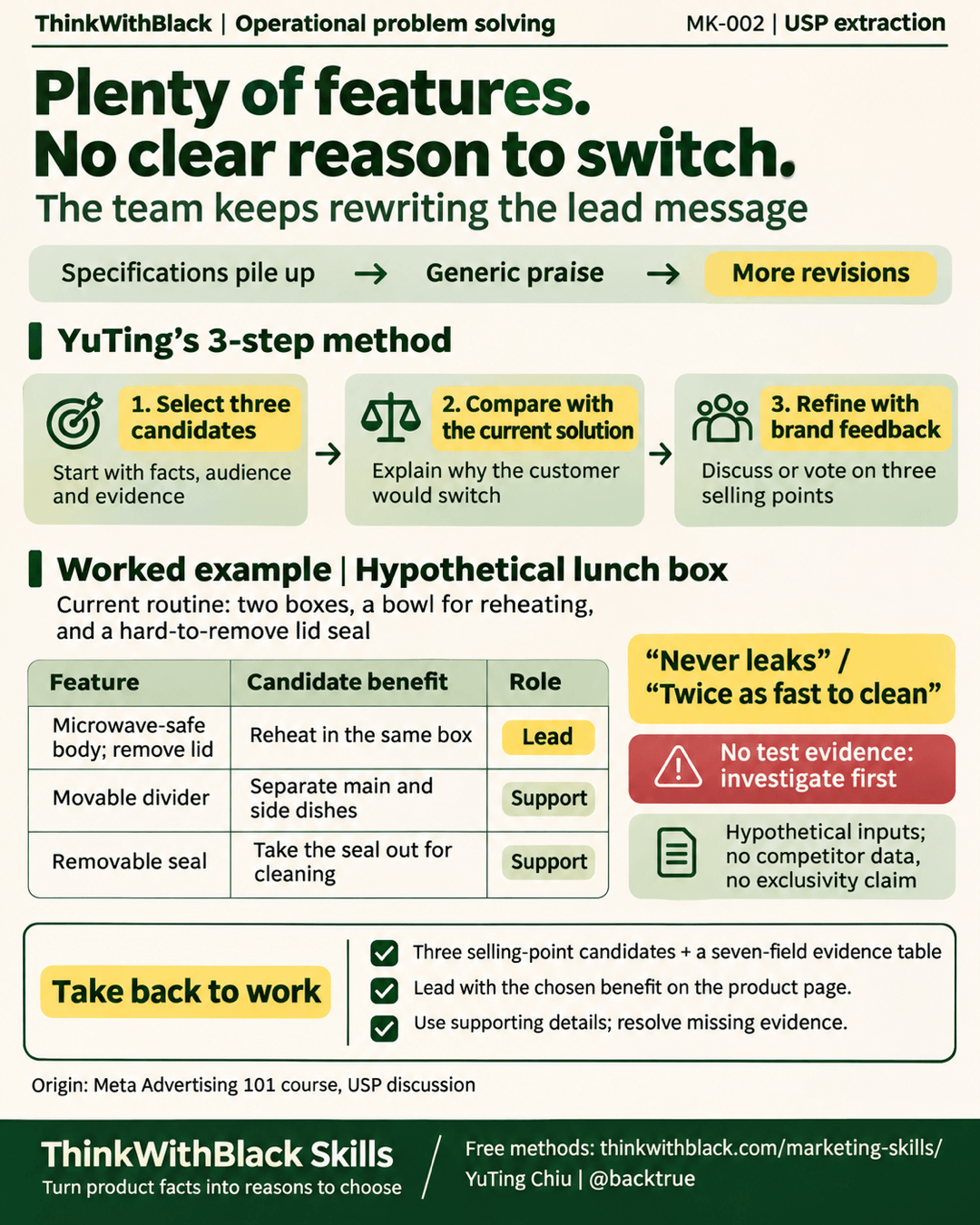
The method runs in three steps [3]:
Step 1: Propose three primary USP candidates from the product data. Feed the product specifications, target customers, comparison data, and verifiable facts to the AI together, and ask each of the three candidates to state one concrete reason to buy that can anchor the product page and follow-up ads. The course caps this at three ("the more selling points, the lower the profit") and maps out where those three USPs go next: they become the three featured sections on the product landing page, and they supply the "F (Feature)" when you expand the copy using the FABE framework [2].
Step 2: Contrast each candidate against the customer's current routine or alternatives. Each candidate must explain why the product is worth choosing in that specific situation, replacing generic labels that could fit any competitor. When you only have data on your own product, state functional benefits with their usage conditions attached; if you want to claim "only in the industry" or "number one," attach the competitor comparison data that proves it [3].
Step 3: Revise with brand feedback, then narrow to three selling points by discussion or vote. The brand points out which use case needs adjusting, which usage limits must be added, or which problem this audience cares about solving first. Looking at the evidence table together, the team assigns each item its role as lead, supporting, or to investigate [3]. This mirrors the classroom exercise in the original course: groups first vote on the USPs they generated or edit them to make sure they are written properly, then feed the three updated USPs back to the AI for refinement—a workflow that also works directly as an internal company brainstorm [2].
The course slides also give three checks to verify whether a USP is written properly [2]:
- Exclusive: Could you paste this USP onto another product without changing a word? If a competitor could use it directly, dig back into your product's specific conditions.
- Personal: Does the sentence put the user in the subject line, showing both the product feature and the situation the user is in?
- Data-backed: Numbers make a USP harder to wave away. When you have test results or spec measurements, include them to back up the claim.
These three checks come back into play later when deciding whether to swap out a lead message.
Worked Example: An Office Lunch Box
The product, documents, customer needs, and team discussion below are hypothetical teaching materials created for practice; they do not describe a real brand or client campaign. The sample product is the L-800 lunch box, aimed at office workers who pack their own lunch.
The team starts with three practice documents:
- Hypothetical spec sheet A1: lists a microwave-safe box body, a movable divider, and a removable lid gasket for washing
- User manual B2: instructs the user to remove the lid before microwaving and wash according to the manual
- Scenario brief C3: sets up the target buyer's current routine—packing main and side dishes in two separate containers, transferring food into a bowl to microwave it at the office, and struggling with a lid gasket that is hard to pry out (these are practice assumptions for the exercise, not findings from a customer survey)
These files cover product specs and scenario assumptions, without competitor specs, timed washing tests, or leak tests. The team fills out the seven-column table using what is on hand. In practice, you fill out the table from left to right: complete the four left columns first ("factual feature, customer task, tangible benefit, basis for comparison"), then complete the three right columns ("suitable angle, lead/supporting/to investigate, reason"). Any row where the four left columns trace cleanly to a document ID can compete for the lead or supporting slots. If a row cannot cite a specific document clause under "factual feature" or "basis for comparison," it needs more evidence and goes straight into the "to investigate" row:
| Factual feature | Customer task | Tangible benefit | Basis for comparison | Suitable angle | Lead/supporting/to investigate | Reason |
|---|---|---|---|---|---|---|
| Microwave-safe body; lid must be removed, per A1, B2 | Reheat a packed lunch at the office | Reheat food in the same box body, keeping the lid-off condition clear | C3 assumes buyers currently transfer food to a bowl before reheating | Reheat your lunch right in the box at the office | Lead candidate | Matches the top priority need in this scenario; usage conditions trace to A1/B2 |
| Movable divider, per A1 | Keep the main dish and sides separate | Pack main and side dishes in separate sections of one box | C3 assumes buyers currently carry two separate boxes | Keep mains and sides in separate sections | Supporting candidate | Explains the storage layout while sticking to the documented divider spec |
| Removable gasket, per A1, B2 | Wash the lid and gasket | Pull out the gasket to wash each piece individually | C3 assumes buyers' current lid gaskets are hard to remove | Pop out the lid gasket to wash every part | Supporting candidate | Backed by structure and manual instructions; describes the disassembly and washing action |
| Completely leakproof / twice as fast to clean | Carrying and cleaning | Claimed results lack evidence | No leak test or comparative washing times on file | Log missing evidence first | To investigate | Gasket and removable parts require leak testing and timed washing comparisons to back up these two claims |
The first three rows are the three selling-point candidates. The fourth row catches claims that still need proof, keeping them on a to-investigate list rather than among the three approved selling points. Every comparison in the table refers strictly to the routine assumed in C3 for this exercise.
Row four shows why the left-to-right order matters: "completely leakproof / twice as fast to clean" cannot cite a test clause in A1 or B2 under Factual feature, and has no test or timing data under Basis for comparison. Marking it "to investigate" routes it to the product team for follow-up testing and keeps unsupported claims out of the draft before copywriting even starts.
Where Does Brand Feedback Change the Table?
Suppose the AI reads the spec sheet and drafts its first three points as "completely leakproof, super-fast cleaning, high-quality material." Checking that draft against documents A1, B2, and C3 and the seven-column table, the brand manager can give four specific corrections: "For this campaign, focus first on the hassle of transferring food into a bowl to microwave at the office. The box body is microwave-safe, provided the lid comes off. The divider separates food sections—it's a storage layout, not a leak test. And while the gasket comes out for washing, our files only describe taking it apart to clean, with no timed comparison on washing speed."
When the team applies that feedback to the seven-column table, the practice discussion settles on three clear selling points:
- Take off the lid and reheat lunch right in the box body (lead)
- Movable divider keeps main and side dishes in separate sections (supporting)
- Pull out the lid gasket to wash each piece individually (supporting)
Point one takes the lead slot and the other two take supporting slots, following the priority order of customer problems set in C3.
Notice the four moves in the brand's feedback: first, it names the priority customer task for this campaign (reheating without switching bowls); second, it attaches the required operating condition (remove the lid before microwaving); third, it bounds what the physical structure actually does (the divider organizes food sections); and fourth, it flags the unverified claim (washing speed needs timed test data). Because the feedback speaks directly to those four levels, every affected cell in the seven-column table updates cleanly. Copywriters and designers can still debate the sharpest wording, but they are working from the same specs, usage conditions, and customer task—and when the designer opens the table, it is immediately clear why the hero image on the page needs to show someone reheating lunch in an office microwave.
Turning the Table into Daily Operations
Once approved, the "three evidence-based selling-point candidates and seven-column comparison table" translates directly into tasks for copywriting, design, and merchandising:
- Product page and ad creative layout: The top screen of the product page leads with the chosen reheating angle ("Reheat your lunch right in the box at the office") and keeps the operating condition ("remove lid before microwaving") clearly visible right next to it. Lower sections fill in the movable divider (separating main and side dishes) and the removable gasket (taking parts out to wash individually). Whenever design or copy needs a fresh batch of ads, they pull from this same three-point table, carrying over the approved rationale and conditions without starting from scratch.
- Merchandising follow-up list: The product team takes over the "to investigate" row. If the next campaign wants to lead with "completely leakproof," the team first runs a leak test under defined usage conditions; if they want to claim "faster cleaning," they define the comparison container and washing procedure and clock the times. Once the test results are in, the team updates the affected rows in the table.
For business decisions, working from this table changes two practical outcomes: teams can reuse the approved rationale across placements, and copywriters can send unsupported claims for evidence before adding them to a product page. Under the old habit, turning specs into vague adjectives meant re-litigating the headline every time someone requested a new banner; turning a removable gasket into "twice as fast to clean" or "completely leakproof" meant either getting rejected in legal/product review or taking on compliance risk after launch. Filling out the seven columns before drafting means the same lead message carries across creative batches, and the team only reopens the debate when new test data clears an item from the "to investigate" row or when the target buyer changes. Teams can track their own "revision rounds," "reasons for copy rejection," and "how long a lead angle stays in rotation" to measure the difference in their day-to-day workflow.
Before handing off files, copywriters and designers can run a quick four-question check:
- Does every lead claim trace back to a specific spec clause (such as A1) or manual instruction (such as B2)?
- Does the "basis for comparison" column name the customer's actual current routine or alternative (such as C3's switching bowls to microwave or carrying two boxes), rather than a generic cliché?
- Does the "to investigate" row spell out the exact evidence still needed (such as leak testing, timed washing tests, or competitor specs)?
- Do all three pieces of creative deliver the same lead angle and usage conditions so they can be reused across placements?
If all four answers trace cleanly to cells in the table, the creative is ready for production and launch. If any question comes up short, fix that cell in the seven-column table before shipping the copy.
When Should You Change the Lead Message?
During a campaign, four specific conditions tell the team it is time to reopen the seven-column table and adjust the lead [2][3]:
- Brand feedback shifts the priority task or adds usage limits: In the L-800 lunch box example, if the brand confirms that this wave's buyers care most about grime trapped in lid crevices and rank reheating second, "pull out the lid gasket to wash each piece individually" moves up to the lead slot, and reheating in the box body moves to a supporting slot. The lead choice always follows the target audience's priority needs as documented in briefs like C3.
- New test evidence changes what a candidate can claim: When the product team delivers leak-test reports or timed washing comparisons, claims sitting in "to investigate" can move into Factual feature and Basis for comparison and be reconsidered for the lead slot. Conversely, if new testing changes an operating condition, keep the earlier table version on file, flag the affected claims, and rewrite that row [3].
- All three candidates could apply word-for-word to a competitor: Run the course's "exclusivity" check. If you can drop your three candidates onto another product in the same category without changing a word, your angle is still stuck at the category level. Go back to the "factual feature" and "customer task" columns to reconnect your product's specific usage conditions to the buyer's task [2].
- The product files list technical terms without explaining what they do: When your source files only give material codes or structural part names without showing what they do under real usage conditions, verify how the structure works with the product team first, then write the functional benefit from that confirmed explanation [3].
A Prompt You Can Copy Straight into AI
Copy the prompt below and paste it into your AI tool along with your product files:
Please read MK-002 first. Based on the product specifications, target customers, current routine/alternatives, and evidence I provide, propose three primary USP candidates. For each candidate, fill out all seven fields: factual feature, customer task, tangible benefit, basis for comparison, suitable angle, lead/supporting/to investigate, and reason. Keep all source references and operating conditions attached. Then revise the table based on my brand feedback and help us narrow down to three final points through discussion or voting. Do not claim industry exclusivity or a number-one ranking without competitor data, and for any effect that lacks proof, list the exact evidence that still needs to be supplied.
Hypothetical lunch box, documents, and packed-lunch scenario · benefit candidates retain operating conditions
Download ThinkWithBlack Skills to Organize Your Own Three Selling Points
Head to ThinkWithBlack Skills, download the complete MK-002 method pack, and feed the method pack, your product specs, and the lead message you are currently stuck on to your AI assistant. Generate three traceable candidates first, then sit down with your team to decide how to deploy them—and while you're on the site, you can also click through to GitHub and give the project a Star to bookmark it.
Run MK-002 on your own product data
Download the MK-002 method pack
First time using the library? Download the index first so the AI can pick the right skill, then upload the complete method pack along with your product files.
Download the INDEX.md index · View full operating instructions
Social Media Posts for This Skill
Select a platform to view the infographic cards and post for this Skill:
YuTing Chiu (Xiaohei Laoshi) · @backtrue · ThinkWithBlack
Skill guide compiled by: Author background and courses
Find other Skill articles by operational problem →
References
- Meta Advertising Course 101: Let AI Help You Run Ads. Course slides, Slide 13 "Foundational logic for viewing a USP." (Return to citation)
- Meta Advertising Course 101: Let AI Help You Run Ads. Course slides, Slide 9 "The logic of working with AI," Slide 10 "Three deliverables after completing this unit," Slide 14 "How to check whether a USP is written properly," Slide 15 "Group discussion #1," Slide 16 "Step two: confirm the product's 'selling points.'" (Return to citation)
- ThinkWithBlack, "MK-002 | Unique Selling Proposition Extraction" method draft v0.3, Section 3 "Specific method for this skill," Section 5 "Result branches," Section 6 "Standard delivery fields." Source attribution in the method draft points to the USP unit of the original course slides (Slide 9). Complete MK-002 method pack. (Return to citation)