Lin Yijun manages new-product launches at an outdoor gear company, and when the product page, ads, and customer-service notes for a commuter cold-drink cup all came due at once, she followed her usual routine by pasting a few key lines from the specification sheet, instruction manual, and brand presentation into the AI to generate all the drafts in one pass. When she checked the output against the original documents, she found that the AI turned the manual's cold-drinks-only restriction into suitability for both hot and cold drinks and wrote the presentation's unverified cooling claim as settled fact. When tweaking the wording on the product page still left old claims in the ad creatives and conflicting answers for customer service, she stopped revising sentences one by one and checked what the AI identified and which source backed each statement before it started writing.
Why drafts fail before the AI writes a word
Lin Yijun (林怡君) manages new-product launches at an outdoor gear company. Her current launch is the C-600 cold-drink cup, built for office commuters who carry cold drinks on the way to work. Two weeks before launch, the product page, ads, and customer-service notes are all due at once. Following her usual routine, she pulls a few key lines from specification sheet A1, instruction manual B2, and brand presentation C3, pastes them into the AI, and asks it to "make the copy more appealing," hoping to generate copy for all three channels in one pass.
The first draft comes back quickly and reads smoothly. When Lin Yijun checks the details, though, she spots trouble: instruction manual B2 explicitly states "cold drinks only," yet the AI wrote "suitable for both hot and cold drinks." And the line "keeps drinks cold for 24 hours" from brand presentation C3—which still lacks test conditions—came back stated as settled fact, as if testing were already complete.
Her first instinct is to tweak the wording. She swaps "both hot and cold" for more cautious phrasing and asks the AI to polish the product page again. Right after she fixes the product page, she checks the ad creatives scheduled to launch two days later and finds the old sentence still sitting there. At the same time, a customer-service colleague gets a shopper question—"Can this cup hold hot tea?"—finds conflicting notes in the internal files, and comes back to ask her. Lin Yijun has to message the product team again to confirm. Her pre-launch week goes into cross-checking three different versions.
Why does the same problem keep coming back after you fix the adjectives?
When you only feed the AI fragments like "tumbler, easy to carry, keeps drinks cold for a long time," it never sees the full product. Capacities, intended uses, and restrictions for different models in the same product line also frequently sit together in the same source file. If you ask the AI to pick selling points and write usage scenarios right away, whatever feature it misread at the start carries into every draft that follows.
Another common trap is packing specifications, brand talking points, and performance claims into a single paragraph. "Capacity 600 mL" and "best in the industry" both look like product descriptions on the surface. But "capacity 600 mL" is a product specification, whereas "best in the industry" requires a named benchmark, testing under identical conditions, and supporting evidence before you can cite it as a comparative claim.
MK-001 solves this by keeping the source location and applicable conditions attached to every item. Having a live product page means you can trace where the original text came from, while any performance claims on that page still require independent test evidence. Brand-supplied statements go into the table too, labeled clearly so anyone reading the sheet can tell what kind of source they came from.
A new product is about to launch, and the product page, ads, and customer-service notes are all on deadline. You paste a few specifications into the AI and ask it to make the copy more appealing. The sentences come back smooth, but "cold drinks only" has turned into "suitable for both hot and cold drinks," and an ice-retention claim that still needs test conditions now reads like a proven fact.
At that point, changing one adjective will not fix the problem because the error stays in the other versions. You fix the product page, but the ad draft still carries the old line. Customer service needs to reply to a shopper and has to ask the product team all over again whether the cup can hold hot drinks. The days before launch disappear into reconciling different versions.
When copy keeps coming back for revision because product features are wrong, check what the AI identified and which sources it used before it started writing. The fix is to run MK-001 | Product fact inventory first to build a seven-column product fact table and a missing-input list, then revise the product page, ads, and customer-service notes against that table. If the AI has already identified the product and model accurately, and every statement has a traceable source location and applicable conditions, you can move straight to selling-point selection (MK-002). Whenever your source material mixes specifications from different models, or includes performance claims and comparisons without test conditions, come back to this step and complete the product fact inventory first.
This is where MK-001 | Product fact inventory pays off. Put product identification, source materials, and usable wording into one table so copywriters have a clear basis for revisions and the product team can see at a glance which proof to supply—saving the time spent guessing after every rejected draft and chasing answers across departments.
Where Teacher Little Black's method comes from: verify the AI recognized the product first
The complete MK-001 method draws from the USP section of Meta Advertising Course 101 | Let AI Run Your Ads for You. As the course handout notes, the first time you brief an AI on a product, you need to check whether it actually grasped the core facts; wherever the AI still has gaps, the brand adds its own input[1].
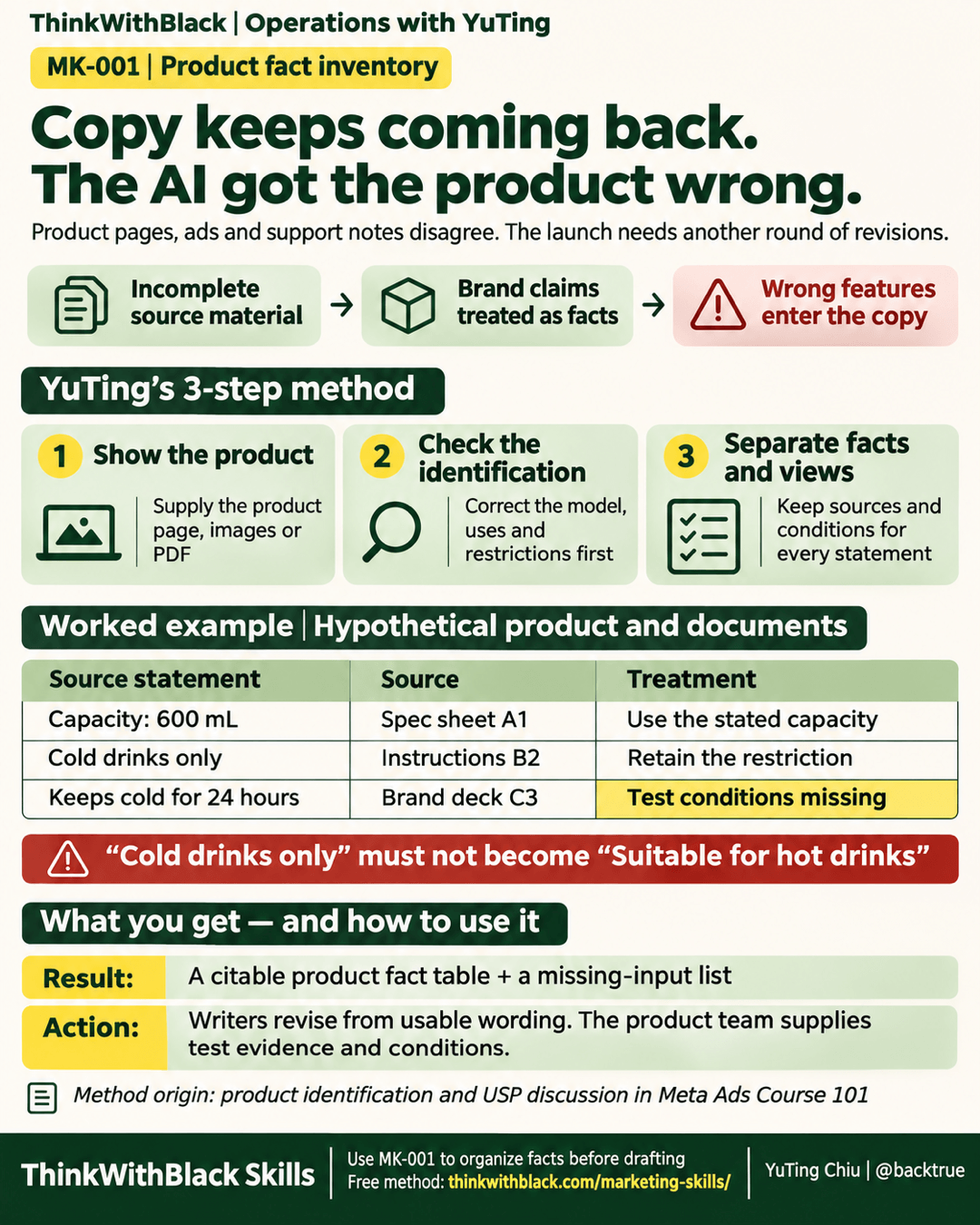
This Skill breaks pre-copywriting preparation into three steps[2]:
First, let the AI see the actual product by giving it the full product page. Because system environments sometimes prevent AI tools from fetching web pages directly and require file uploads instead, you can upload product images manually or press Ctrl+P to save the product page as a PDF and hand that file to the AI so it reads the complete product information[3].
Second, ask the AI to state what product it identified, which model, and what uses and restrictions apply. If anything is off, check the original documents and correct the AI on the spot before you discuss selling points or target audiences. If the AI only picked up the product name, it still needs to read the full specifications and restrictions on the product page before its output can serve as a basis for copy.
Third, separate product facts from the brand's subjective views, recording the original statement, source location, applicable conditions, and usable wording for this round item by item. The brand can still explain which features it wants to highlight, while any functions, performance claims, or rankings that need supporting proof go into a single missing-input list so the teammates following up know exactly what to provide.
Those three steps reversed how Lin Yijun reviews copy. Previously, she waited until a draft was finished and went through it line by line, guessing which claims went too far. Now, before the AI writes a draft, she checks which model it identified and what usage restrictions apply. Her review standard shifted from "does this sentence sound smooth?" to "which source document backs this sentence, and are the applicable conditions spelled out?"
Worked example: one cold-drink cup, three statements handled separately
To see how this check works in practice, let's walk through Lin Yijun's C-600 cold-drink cup. The product, model, and documents in this example are hypothetical teaching materials designed to show each step of the inventory process under a fixed set of conditions: the target buyers are commuters who carry cold drinks; the materials on hand are specification sheet A1, instruction manual B2, and brand presentation C3; the missing materials are competitor comparison data and ice-retention test records.
Lin Yijun first gives materials A1, B2, and C3 to the AI and asks it to report what product it sees. She checks the reply on screen: the model is C-600, the stated capacity is 600 mL, and the manual specifies cold drinks only. If the AI calls it an insulated thermos at this stage or invents a claim that it holds hot drinks, she corrects it against instruction manual B2 immediately so the right usage restriction carries into the next step.
Once she confirms the AI has the product right, she splits the contents of the three documents across MK-001's seven columns:
| Item | Original statement | Applicable product / conditions | Source location | Evidence status | Wording usable in this task | Missing inputs |
|---|---|---|---|---|---|---|
| Capacity | Capacity 600 mL | C-600 | Hypothetical specification sheet A1 | Stated in brand specifications | Stated capacity 600 mL | Source available for checking |
| Intended use | Cold drinks only | C-600, cold drinks only | Hypothetical instruction manual B2 | Stated in brand instructions | 600 mL cold-drink cup; retain the cold-drinks-only condition | No hot-drink suitability data supplied; do not write that it holds hot drinks |
| Cooling performance | Keeps drinks cold for 24 hours | Applicable test conditions not supplied | Hypothetical brand presentation C3 | Brand claim; test basis still missing | Leave the 24-hour performance sentence out of this version | Test record, method, applicable model, and conditions |
This table separates two distinct reasons for revising copy. In row two, instruction manual B2 sets an explicit restriction—"cold drinks only"—so the copy must keep that condition rather than expanding it to "suitable for hot and cold drinks." In row three, "keeps drinks cold for 24 hours" comes from brand presentation C3 and still lacks test data defining the conditions under which it holds true, so that claim stays out of the usable wording for this round.
If the brand presentation also wanted to claim "lasts longer than other brands" or "best in the industry," competitor comparison data tested under identical conditions would likewise go into the missing-inputs column. Until that documentation arrives, the table records only verified facts and sets comparative rankings aside.
Make the missing-input list actionable for the next teammate
If a table simply says "evidence pending," the product manager who receives it still has to ask: "What exact document do you need from me right now?"
To keep handoffs clear, Lin Yijun pairs each disputed claim with the exact document required to change the usable wording for this round:
| Statement to be handled | What needs to be supplied | How the current draft handles it |
|---|---|---|
| Keeps drinks cold for 24 hours | Test record, method, and test conditions for C-600 confirming what the 24-hour result measures | Leave out of the usable performance wording for now |
| Suitable for hot and cold drinks | Hot-drink suitability data for this model; current instructions explicitly state cold drinks only | Revert to cold drinks only |
| Lasts longer than competitors / best in the industry | A named comparison product and test evidence under identical conditions | Do not use comparative or ranking wording for now |
Because every missing item directly governs what the copy can say, both tables stay together in the same working document. Once Lin Yijun pastes them into the team's shared file, review meetings stop revolving around vague hunches. Instead of debating whether a line "feels a bit exaggerated," the team looks at the row and asks a concrete question: "Row three—24-hour cooling—needs C-600's test record and test conditions. Can the product team get that to us by next Wednesday?"
She asks the product contact to claim the items listed under "What needs to be supplied," while customer service takes the "Wording usable in this task" column from the seven-column table as its standard reference for shopper inquiries. All three teams now work from the same master sheet instead of guessing from separate files. Whenever an updated manual or test report comes in later, they update the matching row in this table, pull up every product page and ad draft that used the older phrasing, and revise them together.
What copywriting, product, and customer service do next
With this shared record in place, all three roles can align their next steps and business decisions immediately instead of burning time on cross-version rewrites and repeat questions:
- Copywriters: Revise copy directly from the "Wording usable in this task" column. For the C-600 cup, the product page and ads use traceable statements such as "stated capacity 600 mL" and "600 mL cold-drink cup; retain the cold-drinks-only condition," while dropping hot-drink claims and the 24-hour cooling line from this release.
- Product team: Gather the exact records listed in the missing-input table—test logs, methods, and applicable conditions. Once the C-600 cooling test conditions are in hand, check them against the table to decide what the next version of the copy can support.
- Customer service: Answer shopper questions directly from the intended uses and restrictions recorded in the table. When a customer asks whether the cup can hold hot tea, the representative sees "C-600, cold drinks only" at a glance and gives an accurate answer—without having to guess product capabilities from ad copy or risk customer complaints caused by conflicting claims.
This step delivers a citable product fact table and a missing-input list that tie copy edits and evidence requests to the exact same row of data. Once the team agrees on the usable facts on hand, choosing which feature to lead with and which audience to target starts from solid ground.
That also marks the boundary between MK-001 and the other marketing skills on the site. MK-001 handles the up-front fact inventory, separating what you can state today from what still needs proof. Once your fact table is ready, follow-up work—using mk-002-usp-extraction (MK-002) to select a lead selling point, MK-003 to map competitor differences, or mk-005-evidence-matching (MK-005) to pair selling points with proof—has a verifiable baseline. In this round, focus on getting the facts straight first rather than rushing to pick a headline angle.
When should you move forward, and when should you adjust?
Use three concrete conditions to decide your next move:
- Skip ahead to MK-002: If your product documentation is already complete, the AI's initial check identifies the model, uses, and restrictions accurately on the first try, and every claim has a traceable source location and test conditions, skip rebuilding the full table and take your existing materials straight into MK-002 to choose your lead selling point.
- Unlock new claims and update live drafts: When the designated owner supplies an item from the "Missing inputs" column, first verify that the new document matches the conditions of the original claim (for example, a lab report confirming C-600 keeps water cold for 24 hours at a 25°C room temperature). Next, check every product page, ad, and customer-service script that used the earlier wording. Once both checks are complete, update that row in the table, approve the new wording, and proceed to selling-point selection.
- Flag specification changes for recalculation: If new test data or an updated manual from the product team changes a previously recorded use or specification, keep the earlier entry and its original source location on file, mark affected copy conclusions as "to be recalculated," and review every channel draft citing that row so online and offline wording stays aligned.
Prompt you can copy and give to the AI
Gather your product materials, copy the prompt below, and hand it to your AI tool along with the complete MK-001 method to generate your product fact table:
Please read the complete MK-001 method first, then organize the product page, images, or PDF I provide. First state the product, model, uses, and restrictions you identified so I can verify them; if anything is inaccurate, check the source material and correct it before moving on. Next, deliver a seven-column product fact table using the columns "Item, Original statement, Applicable product / conditions, Source location, Evidence status, Wording usable in this task, Missing inputs," followed by a separate missing-input list covering items that affect the usable wording for this round. Preserve the source status of brand-supplied statements, and do not invent features, performance results, competitor differences, or rankings. Complete the fact inventory first in this round.
Hypothetical product and documents · every statement retains its source and applicable conditions
Get ThinkWithBlack Skills for free
Visit ThinkWithBlack Skills to download the index and the complete MK-001 method, then pass both the method file and your raw product materials to the AI. Next time a draft gets sent back for revision, check which source document backs the disputed line and which condition is missing so every edit has a clear paper trail. If this workflow saves you time, you can also star the GitHub repository linked from the main site.
Bring your materials into MK-001
Download the MK-001 method pack
First time using it: download the index first, let the AI choose the method, then upload the complete method pack with the materials for your task.
Download the INDEX.md index · View the complete usage instructions
Social posts for this Skill
Choose a platform to view the infographic and post for this Skill.
邱煜庭(小黑老師) / YuTing Chiu · @backtrue · ThinkWithBlack
Skill article compiled by: Author background and courses
Find other Skill articles by operational problem →
References
- ↑ Meta Advertising Course 101 | Let AI Run Your Ads for You. Meta Advertising Course 101, Slide 9 (USP section)
- ↑ MK-001 | Product fact inventory. ThinkWithBlack, v0.3 method draft, Section 3
- ↑ Meta Advertising Course 101 | Let AI Run Your Ads for You. Meta Advertising Course 101, Slide 11 (upload product images or product-page PDF)